Dashboard Installation: Notes
- Rotate the plate nuts by hand in the direction of the arrow shown in the figure until they are seated.
CAUTION:
- After removing the dashboard, the plate nuts of the member junctions will have lifted. If the dashboard is removed with the plate nuts lifted, the plate nuts may contact the vehicle body, causing a dent or damage to the coating film, and the dashboard installation will be difficult. Before inserting the dashboard into the cabin, adjust the plate nuts of the member junctions.
- If the plate nuts are tightened completely when installing bolts, the plate nuts may not move resulting in damage to the member junction tab and the vehicle body. After seating the plate nuts, verify that they can be rotated by hand.
NOTE:
- If the plate nuts cannot be rotated by hand, loosen the plate nuts using a hexagonal wrench.
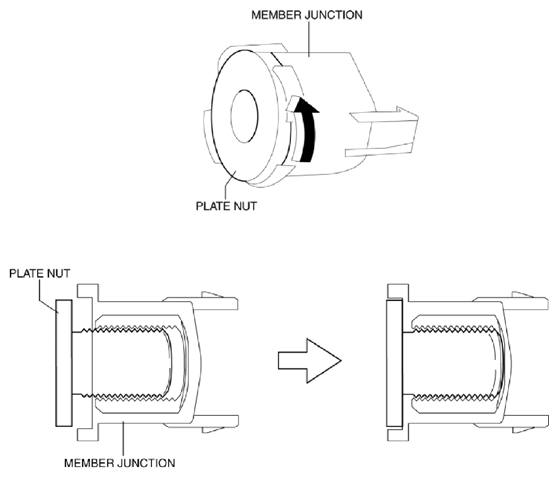 Courtesy of MAZDA MOTORS CORP.
- Verify that the member junction tabs are engaged to the dashboard.
CAUTION:
- If the member junction tabs are disengaged from the dashboard when inserting the dashboard into the cabin, the vehicle body could be damaged. Before inserting the dashboard into the cabin, verify that the member junction tabs are engaged with the dashboard.
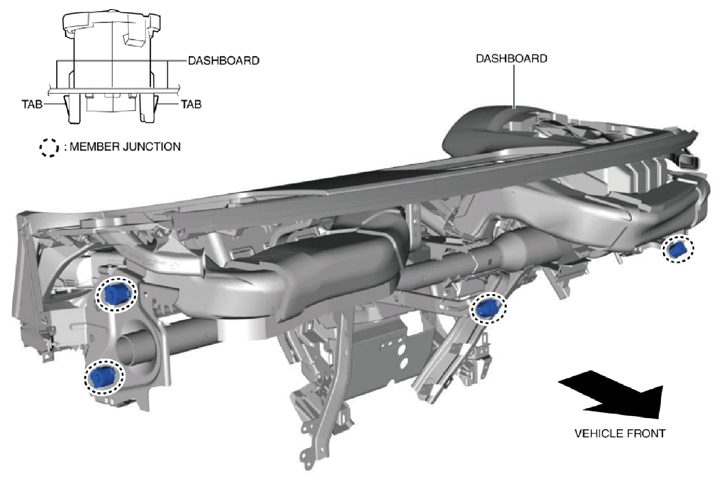 Courtesy of MAZDA MOTORS CORP.
- Insert the dashboard from the front driver-side door or front passenger-side door opening.
- Position the dashboard wiring harnesses at the position of the hook shown in the figure.
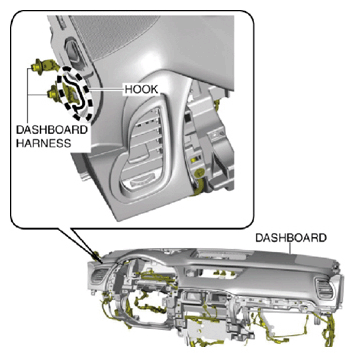 Courtesy of MAZDA MOTORS CORP.
- Move the dashboard in the direction of the arrow shown in the figure, align it with the guide pins on the vehicle body sides, and set it.
NOTE:
- Visually verify the installation condition of the guide pins on the vehicle body sides and the dashboard from the position shown in the figure.
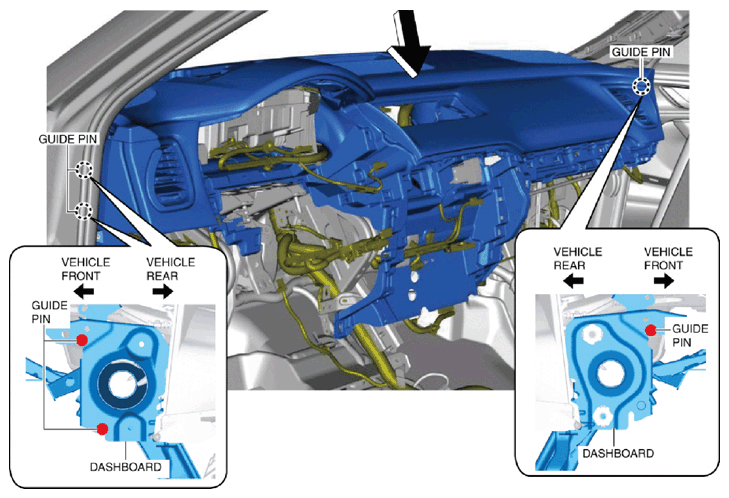 Courtesy of MAZDA MOTORS CORP.
- Insert the bolts on the passenger-side.
NOTE:
- Tighten the bolts to the specified torque after positioning the member junction.
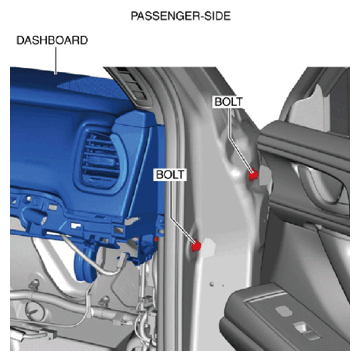 Courtesy of MAZDA MOTORS CORP.
- Tighten the bolts on the driver-side temporarily.
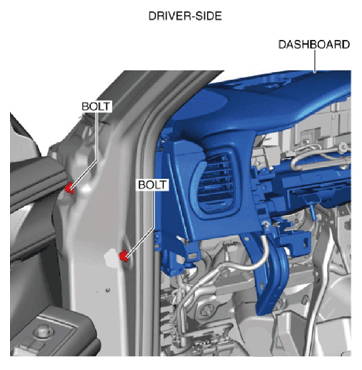 Courtesy of MAZDA MOTORS CORP.
- Tighten the bolts on the passenger-side temporarily.
NOTE:
- After bolts are seated, rotate the plate nuts of the member junctions and visually inspect them from the lower side of the dashboard on the passenger-side to verify that they emerge in the direction of the body panels.
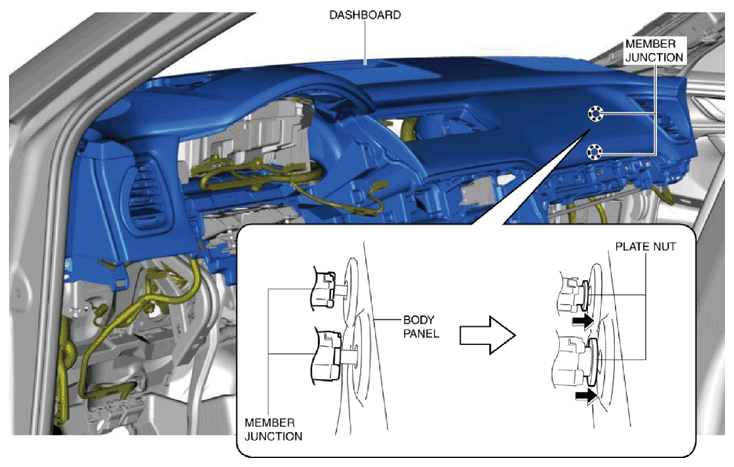 Courtesy of MAZDA MOTORS CORP.
- Verify that the bolt holes on the vehicle side and the bolt insertion position of the member junctions are aligned.
NOTE:
- If the bolt holes on the vehicle side and the bolt insertion position of the member junctions are not aligned, remove the bolts on the driver's and passenger-sides and repeat from Step 5.
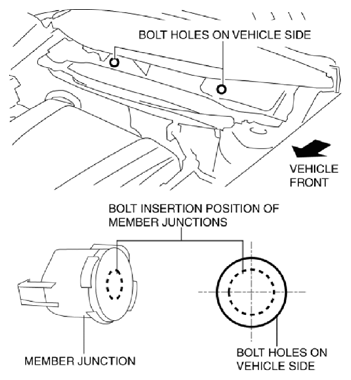 Courtesy of MAZDA MOTORS CORP.
- Tighten the new bolts temporarily.
CAUTION:
- If the bolts are reused, the plate nuts of the member junctions cannot be moved and the dashboard frame and the vehicle body could be damaged. Always replace the bolts with new ones.
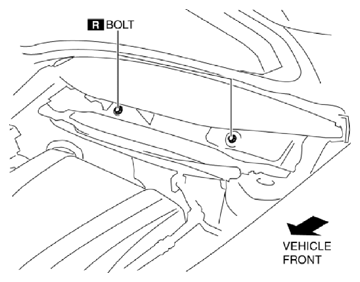 Courtesy of MAZDA MOTORS CORP.
- Tighten the bolts on the driver-side to the specified torque and install the caps.
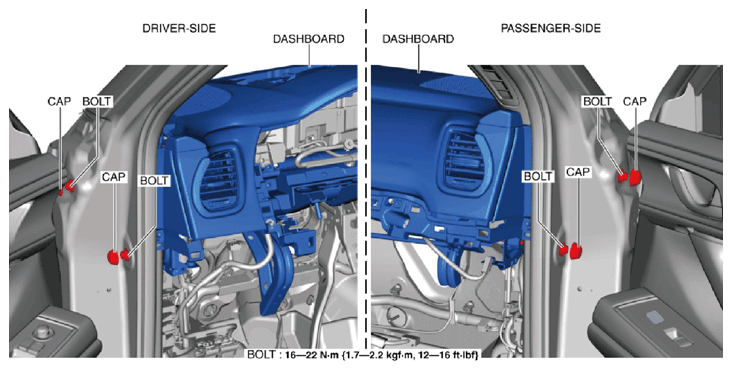 Courtesy of MAZDA MOTORS CORP.
- Tighten the bolts on the passenger-side to the specified torque and install the caps.
- Tighten the bolts to the specified torque.
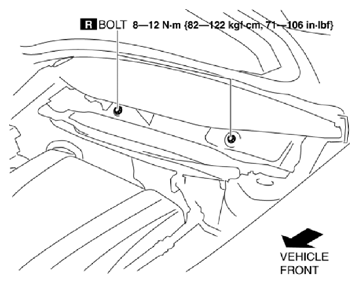 Courtesy of MAZDA MOTORS CORP.
- Install the dashboard bracket.
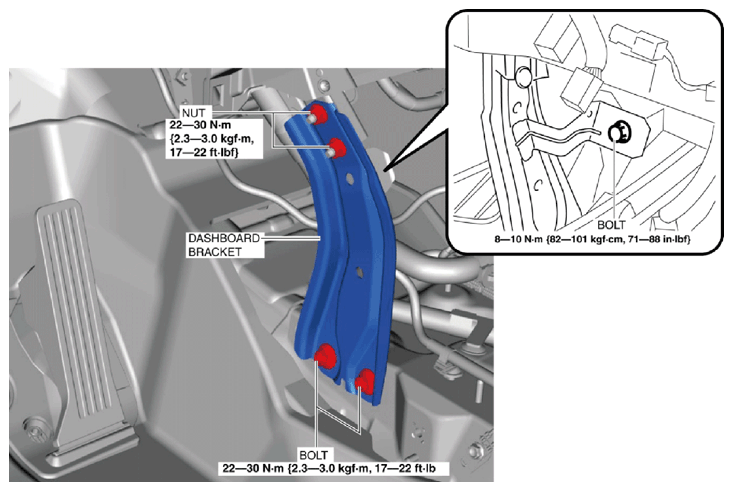 Courtesy of MAZDA MOTORS CORP.
- Install the nuts.
- Install the bolts.
- Connect the dashboard harness connectors and install the wiring harness clip. (Refer to DASHBOARD HARNESS CONNECTOR INSTALLATION NOTE .)
- Install the following parts:
- Connectivity master unit (CMU) (Refer to CONNECTIVITY MASTER UNIT (CMU) REMOVAL/INSTALLATION
.)
- Center display (Refer to CENTER DISPLAY REMOVAL/INSTALLATION
.)
- Front climate control unit (Refer to FRONT CLIMATE CONTROL UNIT REMOVAL/INSTALLATION
.)
- Passenger-side lower panel (Refer to PASSENGER-SIDE LOWER PANEL REMOVAL/INSTALLATION .)
- Selector lever bracket (Refer to AUTOMATIC TRANSAXLE SHIFT MECHANISM REMOVAL/INSTALLATION
.)
- Selector lever component (Refer to AUTOMATIC TRANSAXLE SHIFT MECHANISM REMOVAL/INSTALLATION
.)
- Rear console (Refer to REAR CONSOLE REMOVAL/INSTALLATION .)
- Side wall (Refer to SIDE WALL REMOVAL/INSTALLATION .)
- Front console (Refer to FRONT CONSOLE REMOVAL/INSTALLATION .)
- Console side panel (Refer to CONSOLE SIDE PANEL REMOVAL/INSTALLATION .)
- Shift panel (Refer to SHIFT PANEL REMOVAL/INSTALLATION .)
- Selector lever knob (Refer to AUTOMATIC TRANSAXLE SHIFT MECHANISM REMOVAL/INSTALLATION
.)
- Steering shaft (Refer to STEERING WHEEL AND COLUMN REMOVAL/INSTALLATION
.)
- Joint cover (Refer to STEERING WHEEL AND COLUMN REMOVAL/INSTALLATION
.)
- Knee bolster (Refer to KNEE BOLSTER REMOVAL/INSTALLATION .)
- Driver-side lower panel (Refer to DRIVER-SIDE LOWER PANEL REMOVAL/INSTALLATION .)
- Fuel-filler lid opener lever (Refer to FUEL-FILLER LID OPENER AND LEVER REMOVAL/INSTALLATION
.)
- Hood release lever (Refer to HOOD RELEASE LEVER AND RELEASE CABLE REMOVAL/INSTALLATION
.)
- Light switch (Refer to LIGHT SWITCH REMOVAL/INSTALLATION
.)
- Wiper and washer switch (Refer to WIPER AND WASHER SWITCH REMOVAL/INSTALLATION
.)
- Clock spring (Refer to CLOCK SPRING REMOVAL/INSTALLATION [TWO-STEP DEPLOYMENT CONTROL SYSTEM]
.) (Refer to CLOCK SPRING REMOVAL/INSTALLATION [STANDARD DEPLOYMENT CONTROL SYSTEM]
.)
- Lower column cover (Refer to COLUMN COVER REMOVAL/INSTALLATION .)
- Active driving display (Refer to ACTIVE DRIVING DISPLAY REMOVAL/INSTALLATION
.)
- Meter hood No. 2 (Refer to METER HOOD REMOVAL/INSTALLATION .)
- Global positioning system (GPS) antenna (Refer to GLOBAL POSITIONING SYSTEM (GPS) ANTENNA REMOVAL/INSTALLATION
.)
- Instrument cluster (Refer to INSTRUMENT CLUSTER REMOVAL/INSTALLATION
.)
- Meter hood No. 1 (Refer to METER HOOD REMOVAL/INSTALLATION .)
- Upper column cover (Refer to COLUMN COVER REMOVAL/INSTALLATION .)
- Steering wheel (Refer to STEERING WHEEL AND COLUMN REMOVAL/INSTALLATION
.)
- Driver-side air bag module (Refer to DRIVER-SIDE AIR BAG MODULE REMOVAL [TWO-STEP DEPLOYMENT CONTROL SYSTEM]
.) (Refer to DRIVER-SIDE AIR BAG MODULE INSTALLATION [TWO-STEP DEPLOYMENT CONTROL SYSTEM]
.) (Refer to DRIVER-SIDE AIR BAG MODULE REMOVAL [STANDARD DEPLOYMENT CONTROL SYSTEM]
.) (Refer to DRIVER-SIDE AIR BAG MODULE INSTALLATION [STANDARD DEPLOYMENT CONTROL SYSTEM]
.)
- A-pillar trim (Refer to A-PILLAR TRIM REMOVAL/INSTALLATION .)
- Passenger-side decoration panel (Refer to DECORATION PANEL REMOVAL/INSTALLATION .)
- Dashboard under cover (Refer to DASHBOARD UNDER COVER REMOVAL/INSTALLATION .)
- Glove compartment (Refer to GLOVE COMPARTMENT REMOVAL/INSTALLATION .)
- Front side trim (Refer to FRONT SIDE TRIM REMOVAL/INSTALLATION .)
- Front scuff plate (Refer to FRONT SCUFF PLATE REMOVAL/INSTALLATION .)
- Cowl grille (Refer to COWL GRILLE REMOVAL/INSTALLATION
.)
- Windshield wiper arm and blade (Refer to WINDSHIELD WIPER ARM AND BLADE REMOVAL/INSTALLATION
.)
- Connect the negative battery terminal. (Refer to NEGATIVE BATTERY TERMINAL DISCONNECTION/CONNECTION
.)