Dashboard Installation
- Rotate the plate nuts by hand in the direction of the arrow shown in the figure until they are seated.
CAUTION:
- After removing the dashboard, the plate nuts of the member junctions will have lifted. If the dashboard is removed with the plate nuts lifted, the plate nuts may contact the vehicle body, causing a dent or damage to the coating film, and the dashboard installation will be difficult. Before inserting the dashboard into the cabin, adjust the plate nuts of the member junctions.
- If the plate nuts are tightened completely when installing bolts, the plate nuts may not move resulting in damage to the member junction tab and the vehicle body. After seating the plate nuts, verify that they can be rotated by hand.
NOTE:
- If the plate nuts cannot be rotated by hand, loosen the plate nuts using a hexagonal wrench.
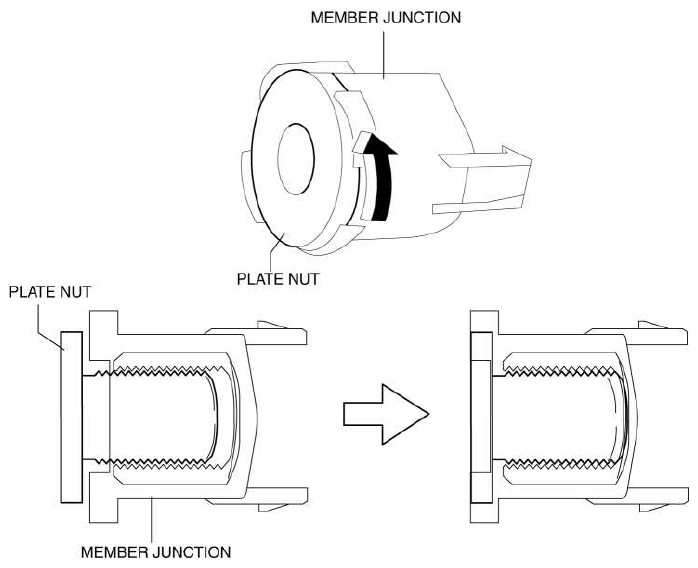 Courtesy of MAZDA MOTORS CORP.
- Insert the dashboard from the front driver-side door or front passenger-side door opening.
CAUTION:
- If the member junction tabs become disengaged from the dashboard when inserting the dashboard into the cabin, the member junction could be damaged. Before inserting the dashboard. into the cabin, verify that the member junction tabs are engaged with the dashboard.
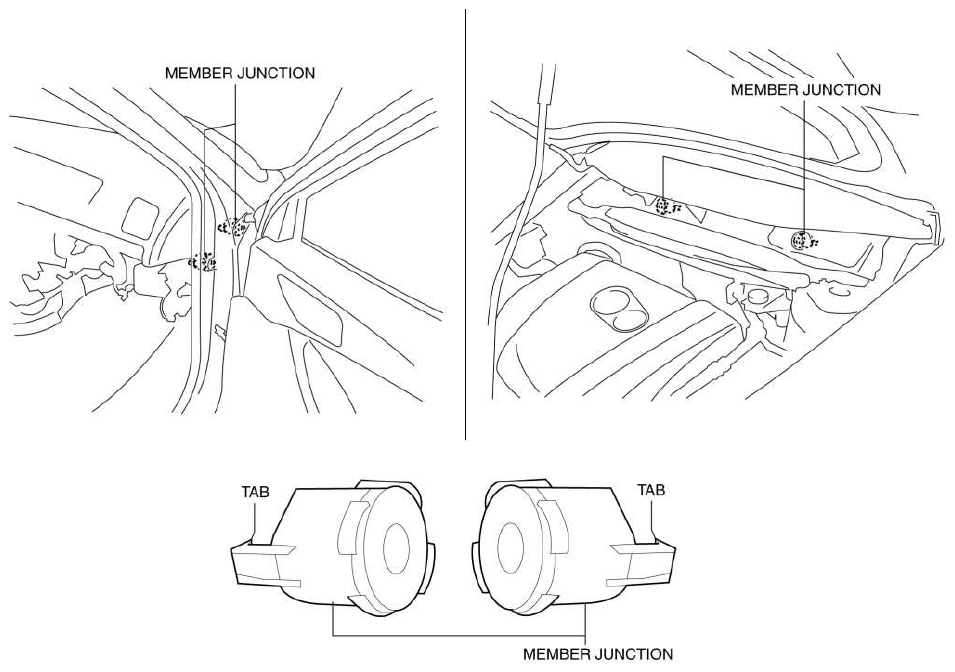 Courtesy of MAZDA MOTORS CORP.
- Move the dashboard in the direction of the arrow shown in the figure, align it with the guide pins on the vehicle body sides, and set it.
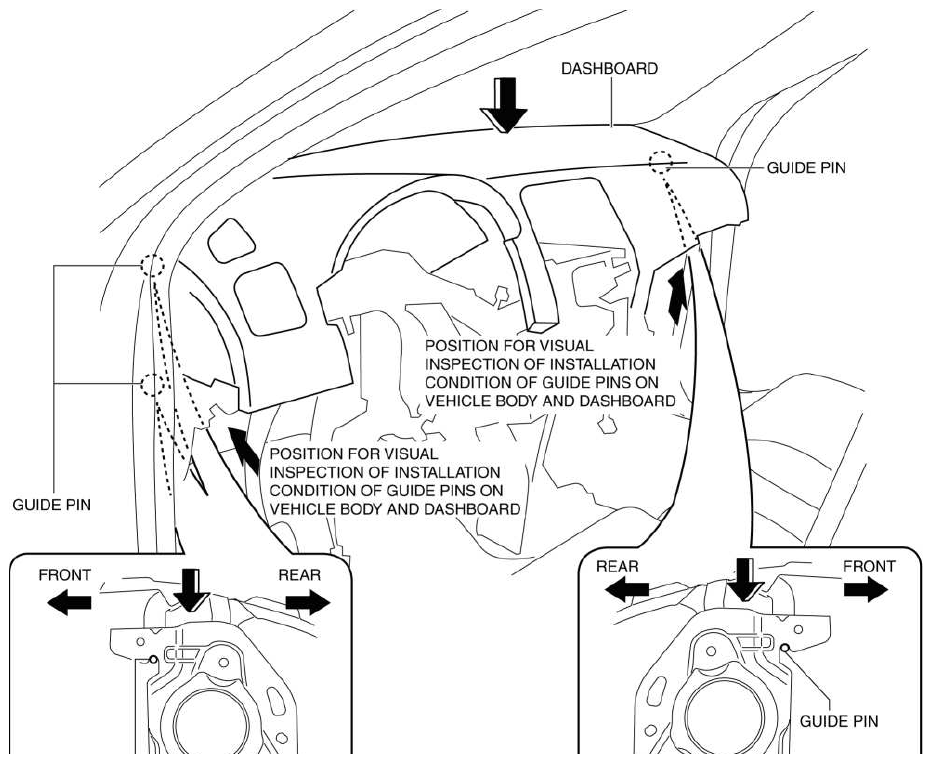 Courtesy of MAZDA MOTORS CORP.
- Insert bolts on the passenger-side.
NOTE:
- Tighten bolts to the specified toque after the member junction position of bolts is positioned.
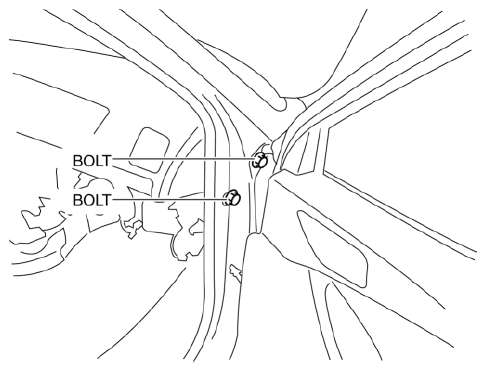 Courtesy of MAZDA MOTORS CORP.
- Tighten bolts on the driver-side until they are seated.
NOTE:
- Do not use a tool to tighten bolts, and instead hand tighten them until they feel sufficiently tight.
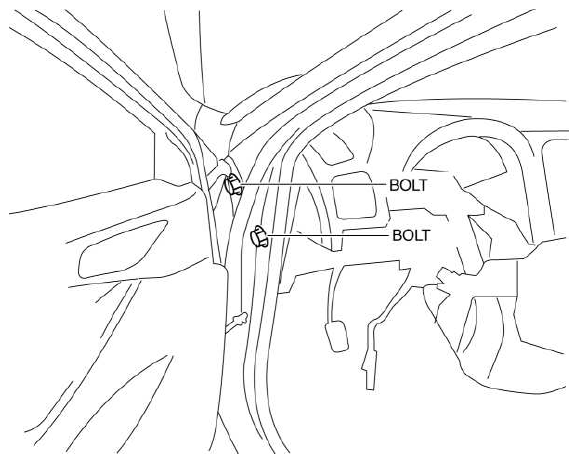 Courtesy of MAZDA MOTORS CORP.
- Tighten bolts on the passenger-side until they are seated.
NOTE:
- After bolts are seated, rotate the plate nuts of the member junctions and visually inspect them from the lower side of the dashboard on the passenger-side to verify that they emerge in the direction of the body panels.
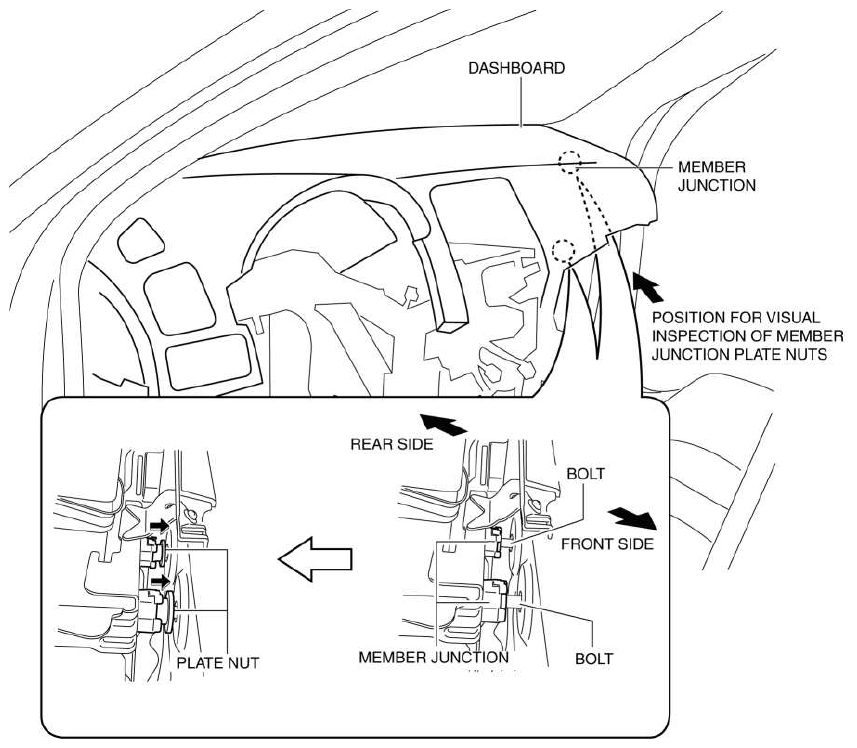 Courtesy of MAZDA MOTORS CORP.
- Verify that the member junction hole of bolt and the through-hole of bolt on the vehicle side are aligned.
NOTE:
- If the member junction hole of bolt is not aligned with the through-hole of bolt on the vehicle side, remove bolts on the driver-side and the front passenger-side, then resume the procedure from Step 5.
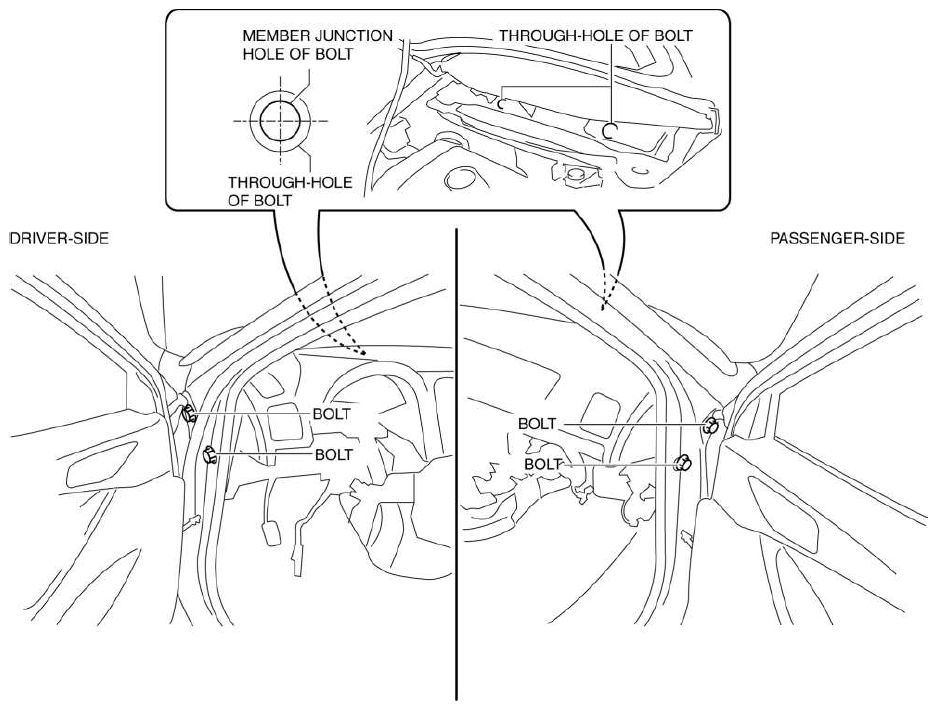 Courtesy of MAZDA MOTORS CORP.
- Seated bolts.
CAUTION:
- If bolts are reused, the plate nuts of the member junctions may not move causing damage to the member junction tabs and the vehicle body. Always replace bolts with new ones.
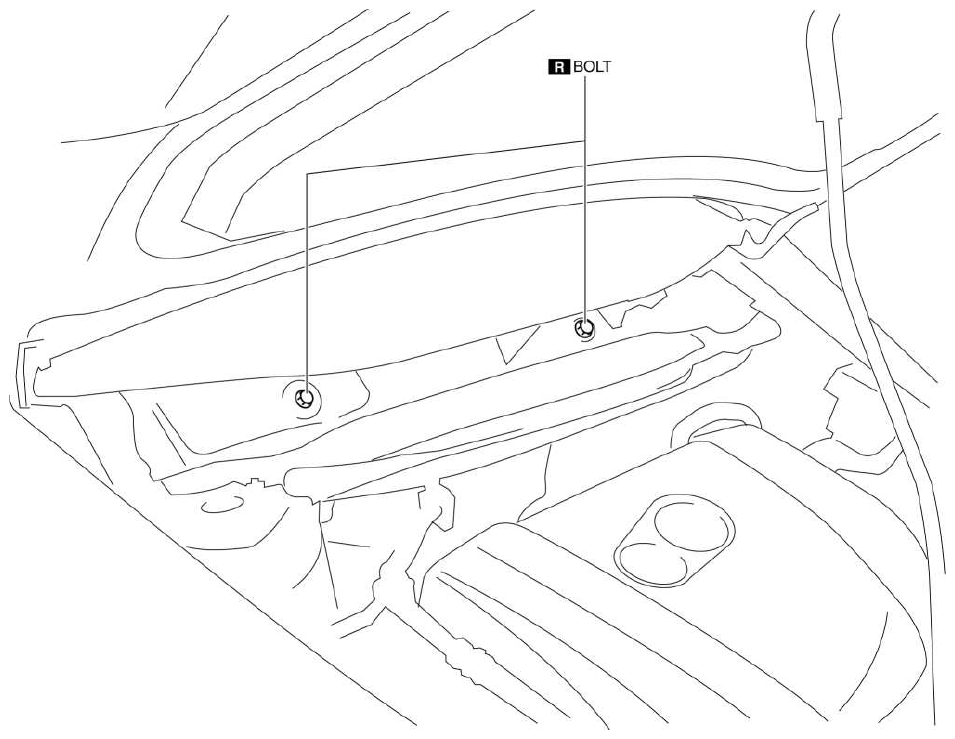 Courtesy of MAZDA MOTORS CORP.
- Completely tighten bolts on the driver-side and passenger-side to the specified torque.
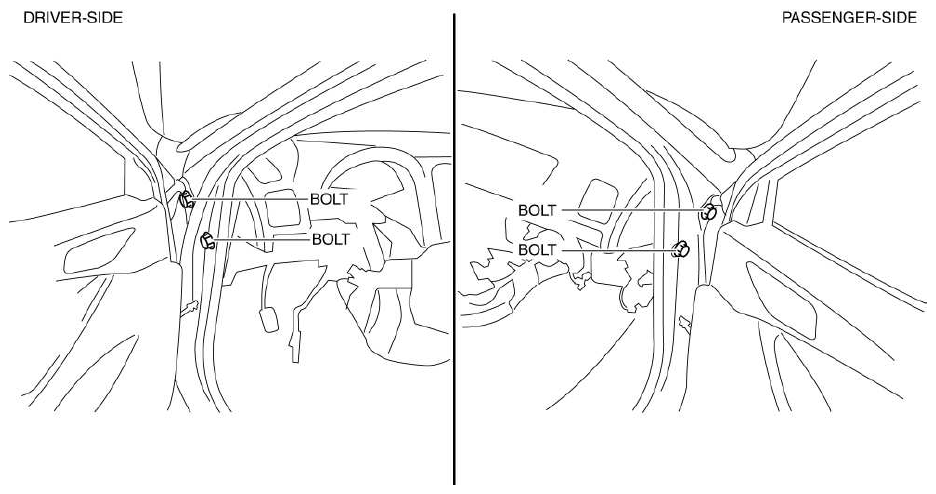 Courtesy of MAZDA MOTORS CORP.
- Completely tighten bolts to the specified torque.
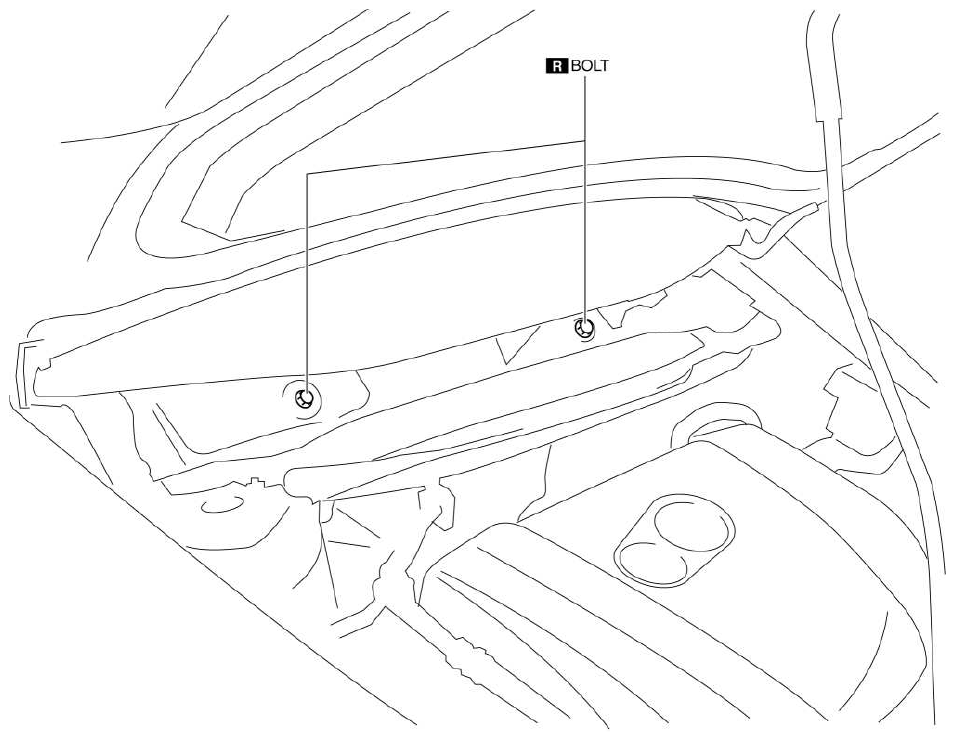 Courtesy of MAZDA MOTORS CORP.
- Install the caps.
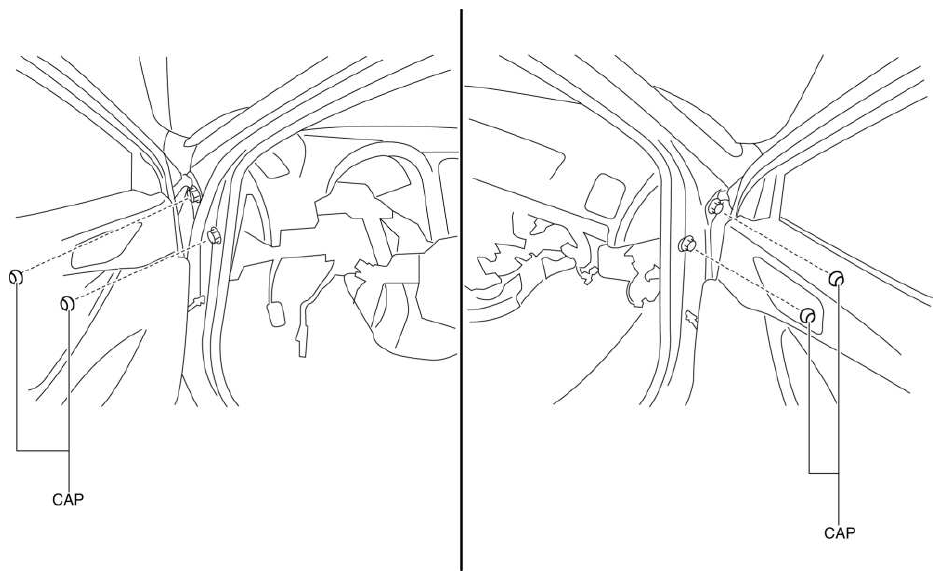 Courtesy of MAZDA MOTORS CORP.
- Install the dashboard bracket.
- Install nuts.
- Install bolts.
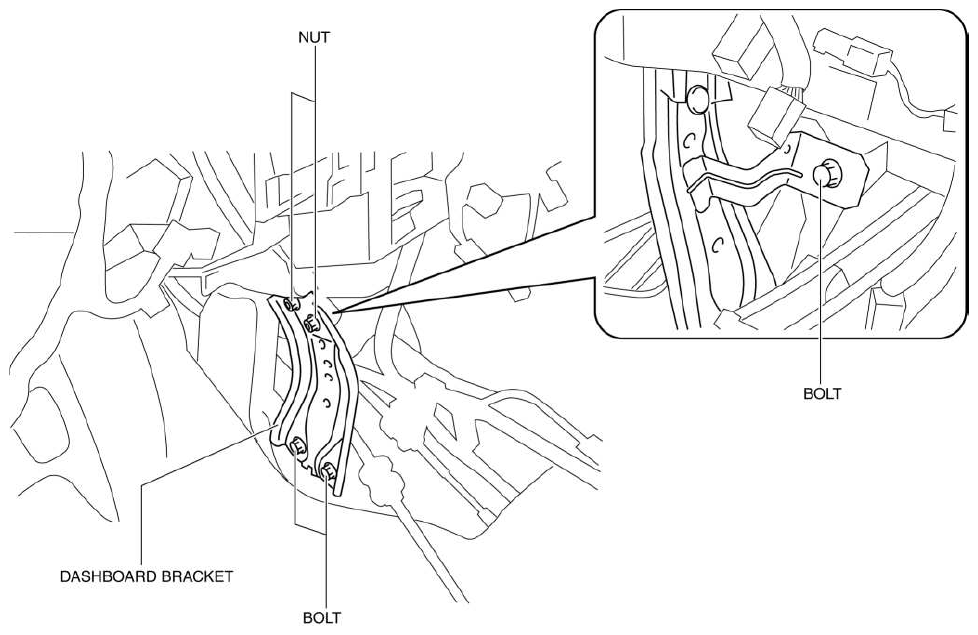 Courtesy of MAZDA MOTORS CORP.
- Install nuts.
- Install the rear console bracket.
- Connect the dashboard harness connectors and install the wiring harness clip.
- Install the parking brake lever component.
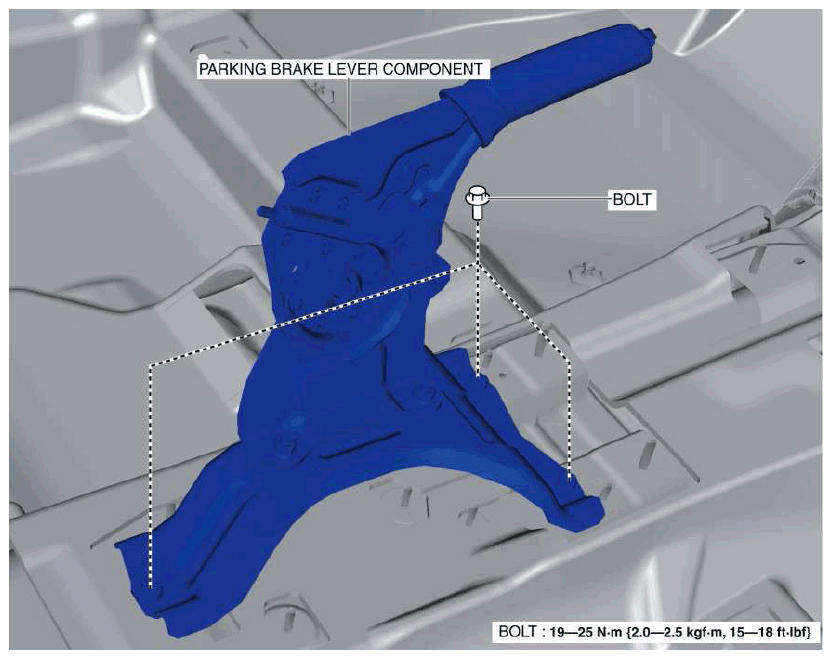 Courtesy of MAZDA MOTORS CORP.
- Install the front console bracket.
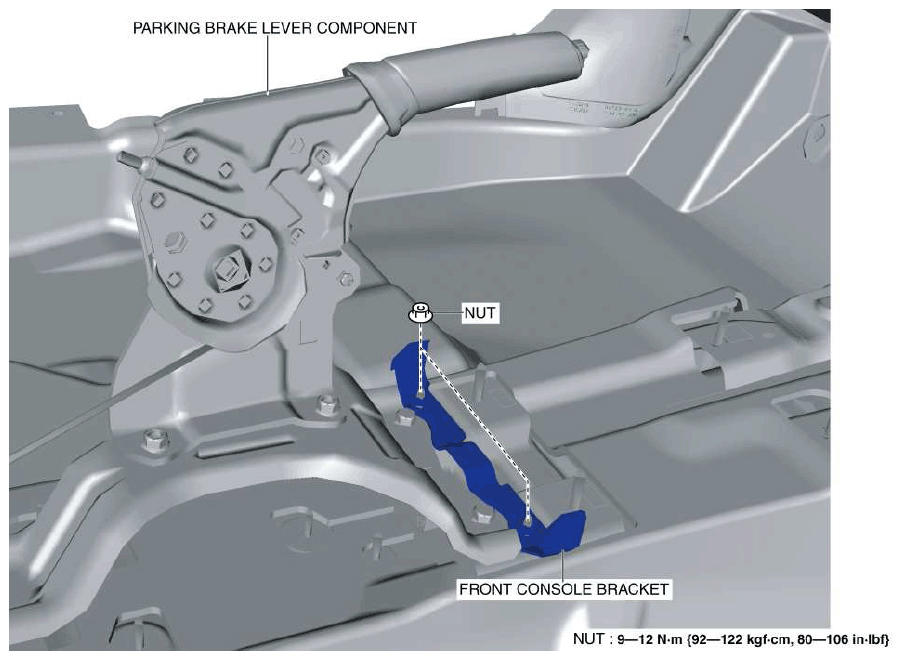 Courtesy of MAZDA MOTORS CORP.
- Install nuts.
- Install the following parts:
- Selector lever component (ATX) (Refer to AUTOMATIC TRANSAXLE SHIFT MECHANISM REMOVAL/INSTALLATION
.)
- Shift lever component (MTX) (Refer to MANUAL TRANSAXLE SHIFT MECHANISM REMOVAL/INSTALLATION [C66M-R]
.)
- Steering shaft (Refer to STEERING WHEEL AND COLUMN REMOVAL/INSTALLATION
.)
- Joint cover (Refer to STEERING WHEEL AND COLUMN REMOVAL/INSTALLATION
.)
- Knee bolster (Refer to KNEE BOLSTER REMOVAL/INSTALLATION .)
- Driver-side lower panel (Refer to LOWER PANEL REMOVAL/INSTALLATION .)
- Fuel-filler lid opener lever (Refer to FUEL-FILLER LID OPENER AND LEVER REMOVAL/INSTALLATION
.)
- Hood release lever (Refer to HOOD RELEASE LEVER AND RELEASE CABLE REMOVAL/INSTALLATION
.)
- Audio unit (without center display) (Refer to AUDIO UNIT REMOVAL/INSTALLATION
.)
- Center display (with center display) (Refer to CENTER DISPLAY REMOVAL/INSTALLATION
.)
- Climate control unit (Refer to CLIMATE CONTROL UNIT REMOVAL/INSTALLATION [FULL-AUTO AIR CONDITIONER]
.) (Refer to CLIMATE CONTROL UNIT REMOVAL/INSTALLATION [MANUAL AIR CONDITIONER]
.)
- Front console (Refer to FRONT CONSOLE REMOVAL/INSTALLATION .)
- Passenger-side lower panel (Refer to LOWER PANEL REMOVAL/INSTALLATION .)
- Decoration panel (Refer to DECORATION PANEL REMOVAL/INSTALLATION .)
- Dashboard under cover (Refer to DASHBOARD UNDER COVER REMOVAL/INSTALLATION .)
- Glove compartment (Refer to GLOVE COMPARTMENT REMOVAL/INSTALLATION .)
- Side wall (Refer to SIDE WALL REMOVAL/INSTALLATION .)
- CD player (with CD player) (Refer to CD PLAYER REMOVAL
.) (Refer to CD PLAYER INSTALLATION
.)
- Front console box (Refer to FRONT CONSOLE BOX REMOVAL/INSTALLATION .)
- Shift panel (Refer to SHIFT PANEL REMOVAL/INSTALLATION .)
- Selector lever knob (ATX) (Refer to AUTOMATIC TRANSAXLE SHIFT MECHANISM REMOVAL/INSTALLATION
.)
- Shift lever knob (MTX) (Refer to MANUAL TRANSAXLE SHIFT MECHANISM REMOVAL/INSTALLATION [C66M-R]
.)
- Rear console (Refer to REAR CONSOLE REMOVAL/INSTALLATION .)
- Upper panel (Refer to UPPER PANEL REMOVAL .) (Refer to UPPER PANEL INSTALLATION .)
- Instrument cluster (Refer to INSTRUMENT CLUSTER REMOVAL/INSTALLATION
.)
- Lower column cover (Refer to COLUMN COVER REMOVAL/INSTALLATION .)
- aa. Meter hood (Refer to METER HOOD REMOVAL/INSTALLATION .)
- ab. Upper column cover (Refer to COLUMN COVER REMOVAL/INSTALLATION .)
- ac. Steering wheel (Refer to STEERING WHEEL AND COLUMN REMOVAL/INSTALLATION
.)
- ad. Driver-side air bag module (Refer to DRIVER-SIDE AIR BAG MODULE REMOVAL [STANDARD DEPLOYMENT CONTROL SYSTEM]
.) (Refer to DRIVER-SIDE AIR BAG MODULE INSTALLATION [STANDARD DEPLOYMENT CONTROL SYSTEM]
.) (Refer to DRIVER-SIDE AIR BAG MODULE REMOVAL [TWO-STEP DEPLOYMENT CONTROL SYSTEM]
.) (Refer to DRIVER-SIDE AIR BAG MODULE INSTALLATION [TWO-STEP DEPLOYMENT CONTROL SYSTEM]
.)
- ae. A-pillar trim (Refer to A-PILLAR TRIM REMOVAL/INSTALLATION .)
- af. Front side trim (Refer to FRONT SIDE TRIM REMOVAL/INSTALLATION .)
- ag. Front scuff plate (Refer to FRONT SCUFF PLATE REMOVAL/INSTALLATION .)
- ah. Cowl grille (Refer to COWL GRILLE REMOVAL/INSTALLATION
.)
- ai. Windshield wiper arm and blade (Refer to WINDSHIELD WIPER ARM AND BLADE REMOVAL/INSTALLATION
.)
- Shift the selector lever from the D position to the P position (ATX).
- Connect the negative battery cable. (Refer to NEGATIVE BATTERY CABLE DISCONNECTION/CONNECTION [SKYACTIV-G 2.0, SKYACTIV-G 2.5]
.)
- Remove the wheel blocks on the front and rear wheels.