DTC B2290
DTC B2290 DETECTION CONDITION AND POSSIBLE CAUSE
| DTC B2290 |
Seat weight sensor signal malfunction |
| DETECTION CONDITION |
WARNING:
- Detection conditions are for understanding the DTC outline before performing an inspection. Performing an inspection according to only the detection conditions may cause injury due to an operating error, or damage the system. When performing an inspection, always follow the inspection procedure.
- Passenger sensing system circuit malfunction
|
| POSSIBLE CAUSE |
- Seat weight sensor calibration not properly set
- Communication error between SAS control module and seat weight sensor control module
- Seat weight sensor control module internal malfunction
- LH or RH seat weight sensor malfunction
|
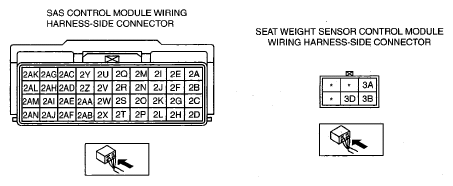 Courtesy of MAZDA MOTORS CORP. Courtesy of MAZDA MOTORS CORP.
|
DTC B2290 DIAGNOSTIC PROCEDURE
| STEP |
INSPECTION |
ACTION |
| 1 |
INSPECT SEAT WEIGHT SENSOR CONTROL MODULE CONNECTOR
- Turn the ignition switch to the LOCK position.
- Disconnect the negative battery cable and wait for 1 min or more.
- Disconnect the seat weight sensor control module connector. (See
SEAT WEIGHT SENSOR CONTROL MODULE REMOVAL/INSTALLATION
.)
- Is there any malfunction of the seat weight sensor control module connector?
|
Yes |
Repair or replace the wiring harness.
After replacement, reperform the DTC inspection and verify that no DTCs are displayed. |
| No |
Go to the next step. |
| 2 |
INSPECT SEAT WEIGHT SENSOR CONTROL MODULE POWER SUPPLY CIRCUIT
- Turn the ignition switch to the ON position.
- Measure voltage at terminal 3A of seat weight sensor control module connector.
- Is voltage more than B+?
|
Yes |
Go to the next step. |
| No |
If there is any malfunction in the wiring harnesses, repair or replace the applicable wiring harness.
After replacement, reperform the DTC inspection and verify that no DTCs are displayed. |
| 3 |
INSPECTION WIRING HARNESS
- Disconnect the SAS control module connector. (See
SAS CONTROL MODULE REMOVAL/INSTALLATION
.)
- Verify continuity in the following wiring harnesses:
- Between SAS control module terminal 2AJ and seat weight sensor control module terminal 3D
- Between seat weight sensor control module terminal 3B and body ground
- Is the continuity normal?
|
Yes |
Go to the next step. |
| No |
If there is any malfunction in the wiring harnesses, repair or replace the applicable wiring harness.
After replacement, reperform the DTC inspection and verify that no DTCs are displayed. |
| 4 |
INSPECT PASSENGER SENSING SYSTEM
- Connect the seat weight sensor control module connector.
- Connect the SAS control module.
- Connect the negative battery cable.
- Verify the following PIDs using the M-MDS. (See
PID/DATA MONITOR TABLE .)
- OCSFLT_CAL
- OCSFLT_COM
- OCSFLT_L
- OCSFLT_MDL
- OCSFLT_R
- Do all PIDs display "OK"?
|
Yes |
Go to the next step. |
| No |
Replace the following parts according to the M-MDS screen:
- If OCSFLT_CAL is displayed:
- If OCSFLT_COM or OCSFLT_MDL is displayed:
- If OCSFLT_L is displayed:
- If OCSFLT_R is displayed:
|
| 5 |
INSPECT SAS CONTROL MODULE
- Reperform the DTC inspection.
- Is DTC B2290 indicated?
|
Yes |
[Present malfunction diangnosis]
[Past malfunction diagnosis]
- DTC troubleshooting completed.
|
| No |
DTC troubleshooting completed. |