Vertical Acceleration Sensor Replacement: Front
- Press the engine start/stop button to select the OFF mode.
- Remove the driver's dashboard undercover (see
DRIVER'S DASHBOARD UNDERCOVER REMOVAL/INSTALLATION
).
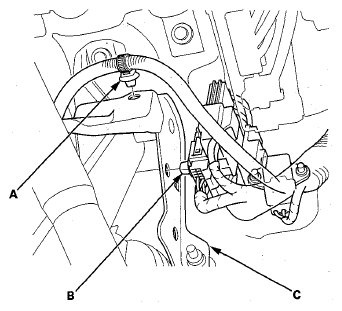
- Detach the harness clip (A) and the connectors clip (B) from the bracket (C) to gain easier access to the vertical acceleration sensor.
 Courtesy of AMERICAN HONDA MOTOR CO., INC.
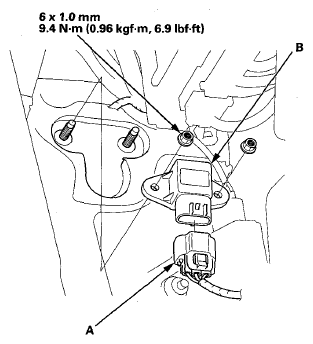
- Disconnect the vertical acceleration sensor 3P connector (A).
 Courtesy of AMERICAN HONDA MOTOR CO., INC.
- Remove the sensor mounting nuts, and pull out the vertical acceleration sensor (B).
- Install the vertical acceleration sensor in the reverse order of removal.
- Test-drive the vehicle, and check that the active damper system indicator does not come on (see ACTIVE DAMPER SYSTEM DAMPER UNITS
).