Integrated Dynamics System Switch Replacement
- Press the engine start/stop button to select the OFF mode.
- Remove the center console panel (see
CENTER CONSOLE PANEL REMOVAL/INSTALLATION
).
- Disconnect the integrated dynamics system switch 12P connector (A).
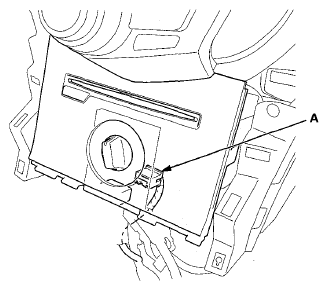 Courtesy of AMERICAN HONDA MOTOR CO., INC.
- Remove the audio-navigation unit (see
AUDIO-NAVIGATION UNIT REMOVAL/INSTALLATION
).
- Remove the screws, then disconnect the connector (A) from the audio panel (B).
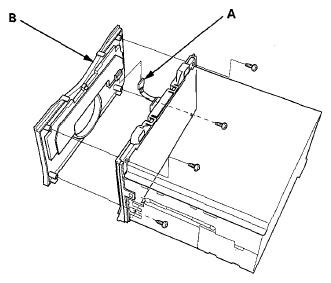 Courtesy of AMERICAN HONDA MOTOR CO., INC.
- Remove the screws, then remove the integrated dynamics system switch (A).
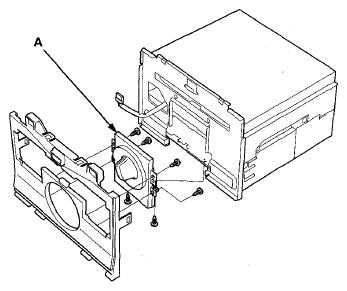 Courtesy of AMERICAN HONDA MOTOR CO., INC.
- Install the integrated dynamics system switch in the reverse order of removal.