Navigation Switch Panel Removal/Installation
- Remove the center panel (see
CENTER PANEL REMOVAL/INSTALLATION
).
- Remove the screws and navigation switch panel (A) from the center panel.
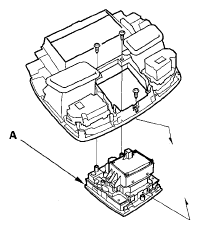 Courtesy of AMERICAN HONDA MOTOR CO., INC.
- Remove the screws (A) and jog dial (B) from the interface dial (G).
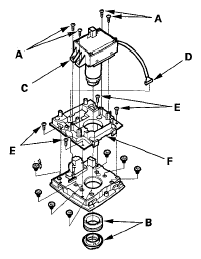 Courtesy of AMERICAN HONDA MOTOR CO., INC.
- Disconnect the connector (D), then remove the interface dial.
- If necessary, remove the screws (E) and cover (F), then remove the bulbs.
- Install the dial in the reverse order of removal.