Multi Media Control Module Overview
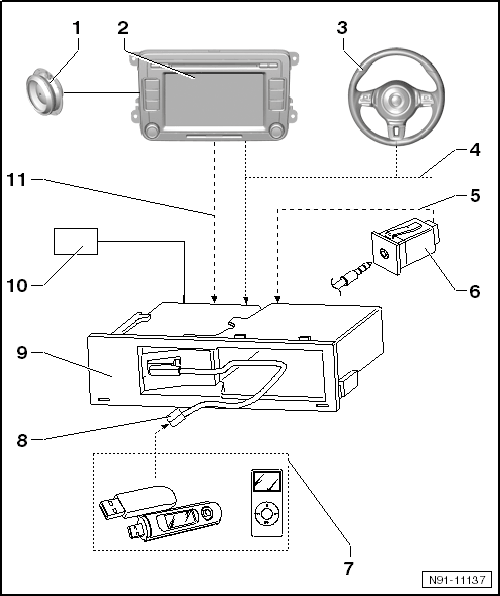 Courtesy of VOLKSWAGEN GROUP OF AMERICA, INC.
- Radio and Radio/Navigation System Speaker System
- Radio Or Radio/Navigation System
- Multifunction Steering Wheel
- CAN Bus
- LF line
- The audio signal from the unit connected to the AUX IN socket runs through this wire and into the multi media control module.
- "AUX IN" socket
- Input Unites For Connecting The Multi Media Control Module
- MP3-Player
- Memory sticks
- iPod player
- Connection to the multi media control module via the USB port
- Wire Connection To The Multi Media Control Unit
- In the form of specific adapter cables depending on the unit to be connected.
- Multimedia Control Module -J650-
- Positive And Negative Voltage Supply Connection For The Multi Media Control Module
- LF line
- The audio signal of the unit connected to the "AUX IN" socket runs from the multi media control module into the AUX input of the radio or radio/navigation system.