Module - HomeLink Transmitter - Remove And Replace: Install
- Install the homelink module into the vehicle.
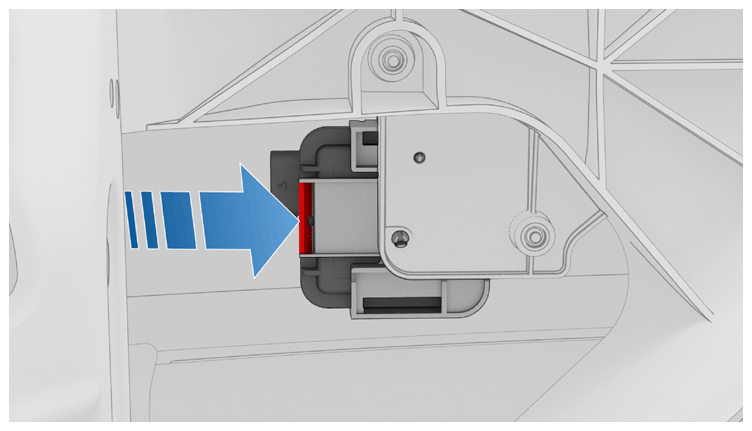 Courtesy of TESLA, INC. Courtesy of TESLA, INC.
|
- Connect the electrical connector to the homelink module, and then engage the connector lock.
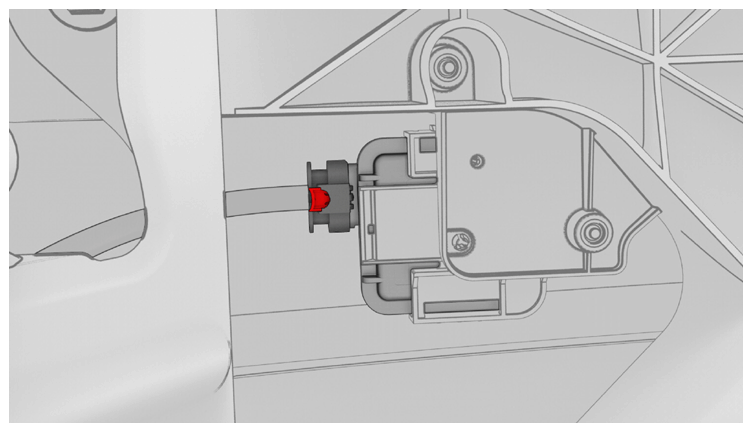 Courtesy of TESLA, INC. Courtesy of TESLA, INC.
|
- Install the underhood storage unit. See Underhood Storage Unit (Remove and Replace)
.
- Reconnect 12 V power. See 12 V/LV POWER (DISCONNECT AND CONNECT)
.
- Connect a laptop with Toolbox 3 to the vehicle.
- In Toolbox, click the Actions/Autodiag
tab, and then search for "HOMELINK".
- Click on TEST-SELF_ VCFRONT_X_HOMELINK
, and then click Run
and allow the routine to complete.
- Disconnect the laptop from the vehicle.
- On the vehicle touchscreen, verify the Homelink icon is visible.
- Install the rear underhood apron. See UNDERHOOD APRON - REAR (REMOVE AND REPLACE)
.
- Raise the LH front window and close the LH front door.