Module - ECU - Occupant Classification System (OCS) - Front Passenger - Remove and Replace: Install
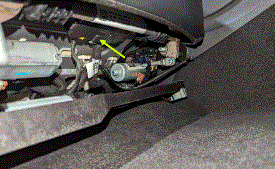
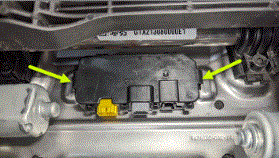
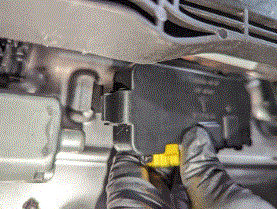
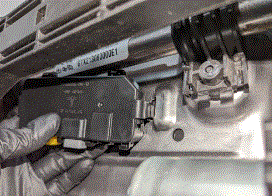
- Position the front passenger OCS ECU module to the vehicle, and then secure the tabs (x2) that attach the module to the seat assembly.
 Courtesy of TESLA, INC. Courtesy of TESLA, INC.
|
 Courtesy of TESLA, INC. Courtesy of TESLA, INC.
|
 Courtesy of TESLA, INC. Courtesy of TESLA, INC.
|
 Courtesy of TESLA, INC. Courtesy of TESLA, INC.
|
- Connect the RH front seat harness connector to the OCS ECU module.
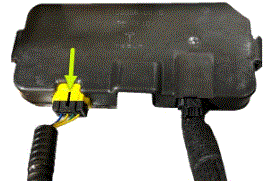 Courtesy of TESLA, INC. Courtesy of TESLA, INC.
|
- Connect the self capacitance trace connector to the OCS ECU module.
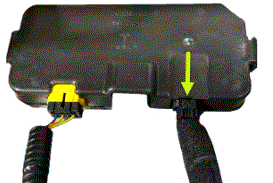 Courtesy of TESLA, INC. Courtesy of TESLA, INC.
|
- Move the front passenger seat to the original position.
- Raise the RH front window and close the RH front door.
- If servicing the front passenger seat in a North American vehicle:
- Remove all objects from the front passenger seat before beginning calibration.
- On the vehicle touchscreen, touch Controls (Vehicle Icon) > Software
and check the vehicle firmware version. If the vehicle firmware is 2023.2.11 or newer, perform a software reinstall. See Software Reinstall - Touchscreen. If the vehicle firmware is not 2023.2.11 or newer, update the vehicle firmware. See Software Update.
- Locally connect a laptop with Toolbox 3 to the vehicle. See Toolbox 3 - Connect and Disconnect
.
- Unlock the vehicle gateway. See GATEWAY (UNLOCK)
.
- In Toolbox, click on the Actions tab, and then search for "OCS".
- Run
the PROC_OCS1P_SELF-CALIBRATION routine.
- Click on the Actions
tab, and then search for "Seat calibration".
- Run
the PROC_VCRIGHT_SEAT-TEST-CALIBRATE routine.
- Disconnect Toolbox and remove the laptop from the vehicle.