- At the alignment rack, verify that the turn and slip plates are locked.
- Align the vehicle to the alignment rack ramps, drive the vehicle onto the alignment rack, and then shift into Park.
- Set vehicle ride height to "Medium": on the touchscreen, touch Controls > Suspension > Medium
.
- Open the LH front door and lower the window.
- On the touchscreen, touch Controls > Service > Wheel Configuration
and confirm that the wheel configuration is set correctly.
- Set the steering wheel/yoke straight ahead.
NOTE:
Use the steering wheel/yoke bubble level to confirm that the front wheels are pointing straight forward.
- With the LH front door open, manually latch the LH front door.
NOTE:
Do not close the door with the latch engaged.
- Put wheel chocks at both sides of the LH rear wheel.
- Connect a laptop with Toolbox 3 to the vehicle. See Toolbox 3 (Connect and Disconnect)
.
- Raise the alignment rack to a comfortable working height.
- Install inflation hoses onto all four wheels so that tire pressures can be set automatically.
- Set the tire machine pressures to match those specified for the vehicle.
NOTE:
Refer to the "Tire and Loading Information" label located on the driver side B-pillar.
- Verify that the chassis height measurement tool (1071271-00-A) is zeroed at 51 mm, and adjust if necessary.
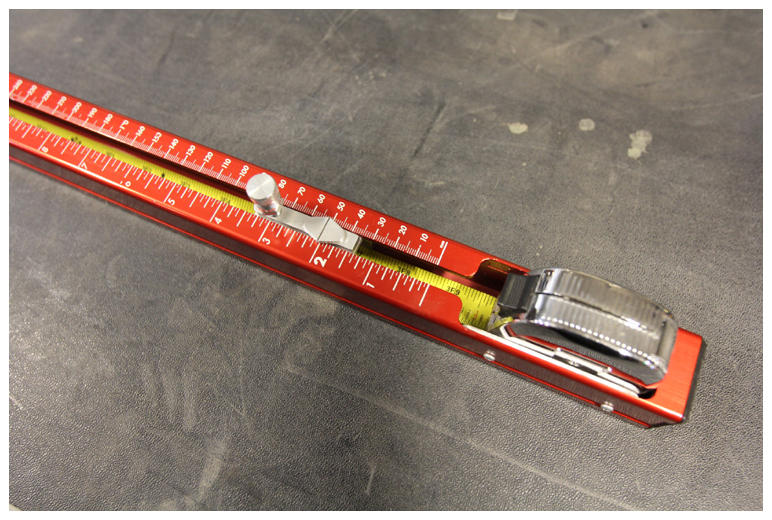 Courtesy of TESLA, INC. Courtesy of TESLA, INC.
|
- Remove the inflation hoses from all four wheels, and then reinstall the valve stem caps.
- In Toolbox 3, select the Actions
tab and search for "Level Tesla Air Suspension", select PROC_TAS_X_LEVEL-TO-HEIGHT
, select Cycle
, and click Run
.
- Perform air suspension calibration: in Toolbox 3, select the Actions
tab and search for "Calibrate Air Suspension", and then select PROC_TAS_X_CALIBRATE-RIDE-HEIGHT
.
- Measure the vehicle ride height at the 4 designated points, enter the measured ride height values into Toolbox, and then click Run
.
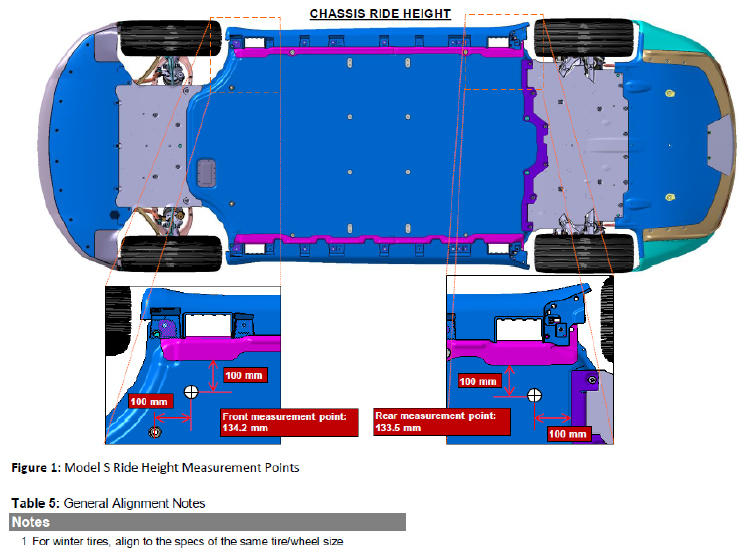 Courtesy of TESLA, INC. Courtesy of TESLA, INC.
|
- In Toolbox 3, select the Actions
tab and search for "Level Tesla Air Suspension", select PROC_TAS_X_LEVEL-TO-HEIGHT
, select Cycle
, and click Run
.
- Check the ride height calibration: in Toolbox 3, select the Actions
tab and search for "Check Tesla Ride Height Calibration", and select PROC_TAS_X_CHECK-RIDE-HEIGHT-CALIBRATION
.
- Measure the vehicle ride height at the 4 designated points, enter the measured ride height values into Toolbox, and then click Run
.
NOTE:
If the routine fails, perform air suspension calibration through Toolbox 3. If calibration fails, find the root cause before continuing this procedure.
Courtesy of TESLA, INC.
|
- Fully lower the alignment rack.
- Disconnect the laptop from the vehicle. See Toolbox 3 (Connect and Disconnect)
.
- Pull the door handle to release the LH front door latch.
- Remove the steering wheel/yoke bubble level.
- Remove the wheel chocks from the LH rear wheel.
- Remove the vehicle from the alignment rack.