- Install the two screws that attach the rear BLE assembly to the fascia.
NOTE:
2x screws, T25, 3 N.m, 2x datums
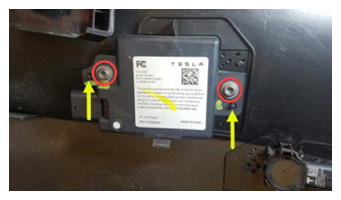 Courtesy of TESLA, INC. Courtesy of TESLA, INC.
|
- Connect the rear BLE assembly electrical connector.
CAUTION:
Push the red locking tab into the connector to engage the locking mechanism. DO NOT push down or pull up on the red locking tab.
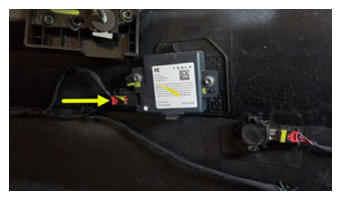 Courtesy of TESLA, INC. Courtesy of TESLA, INC.
|
- Install the rear fascia assembly. See Fascia Assembly - Rear (Remove and Install)
.
- Connect a laptop with Toolbox 3 to the vehicle.
- In Toolbox, click the Actions/Autodiag
tab, and then search for "Service_Redeploy".
- Click UPDATE_SERVICE-REDEPLOY, and then click Run
and allow the routine to complete.
NOTE:
Select "X" at top right of window to close once complete. The routine will state pass but the update will continue to run in the background. The UI will show update progress.
- In Toolbox, click the Actions
tab, and then search for "Endpoint".
- Click TEST-SELF_VCSEC_X_ENDPOINT-COMM, and then click Run Network
and allow the routine to complete.
NOTE:
Click the X at the top right of the window to close the window.
- Disconnect Toolbox and remove the laptop from the vehicle.
- Raise the LH front window and close the LH front door.