Adjust Rear Camber
- If the rear camber is within specification and does not require adjustment, adjust the rear toe. See ADJUST REAR TOE .
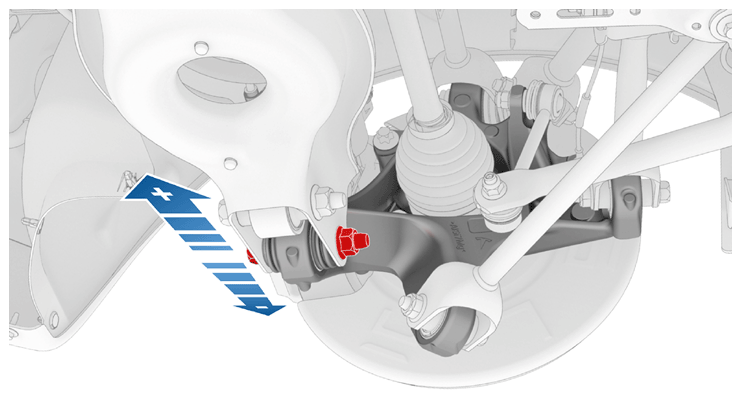
- Slightly loosen, but do not remove, the rear LH lower aft link to knuckle bolt.
 Courtesy of TESLA, INC. Courtesy of TESLA, INC.
|
- Adjust the rear LH camber to specifications. See WHEEL ALIGNMENT
.
- Move the knuckle in toward the centerline to add positive camber.
- Move the knuckle out from the centerline to add negative camber.
- If the camber is correct, go to step 10.
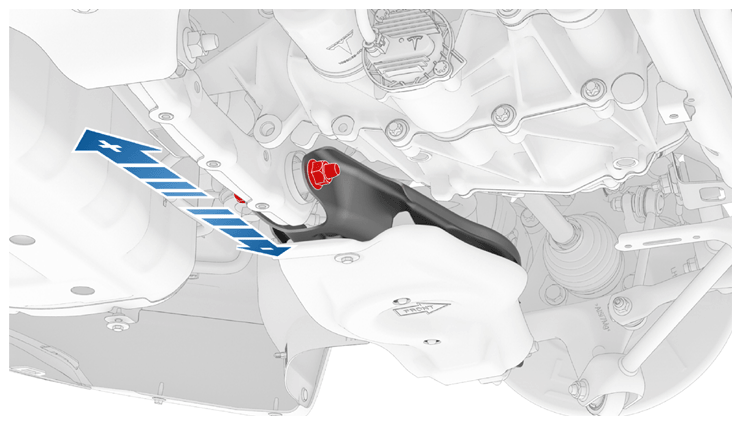
- Slightly loosen, but do not remove, the rear LH lower aft link to subframe bolt.
 Courtesy of TESLA, INC. Courtesy of TESLA, INC.
|
- Adjust the rear LH camber to specifications. See WHEEL ALIGNMENT
.
- Move the link in toward the centerline to add positive camber.
- Move the link out from the centerline to add negative camber.
- If the camber is correct, go to step 10.
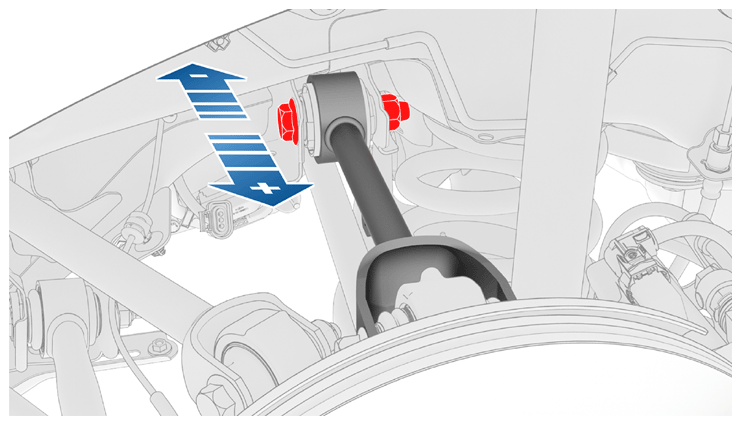
- Slightly loosen, but do not remove, the rear LH upper aft link to subframe bolt.
 Courtesy of TESLA, INC. Courtesy of TESLA, INC.
|
- Adjust the rear LH camber to specifications. See WHEEL ALIGNMENT
.
- To add positive camber, move the link out from the centerline.
- To add negative camber, move the link in toward the centerline.
- If the camber cannot be corrected, escalate a Toolbox session.
- Tighten the suspension bolts that were loosened.
- Lower Aft Link to Knuckle Bolt
 115 N.m (84.8 ft-lbs)
- Lower Aft Link to Subframe Bolt
115 N.m (84.8 ft-lbs)
- Upper Aft Link to Subframe Bolt
134 N.m (98.8 ft-lbs)
- Perform step 2 through step 10 for the RH side of the vehicle if necessary.
- Adjust the rear toe. See ADJUST REAR TOE .