Intermediate Shaft - Steering Column - Lower (Dual Motor) (1st Generation) - Remove And Replace: Installation
- Install the cold weather boot onto the lower intermediate steering column shaft.
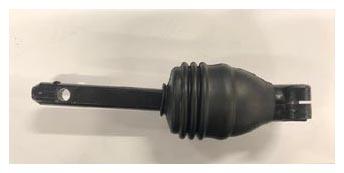 Courtesy of TESLA, INC. Courtesy of TESLA, INC.
|
- Position the lower steering column intermediate shaft for installation on the vehicle.
- Slide the upper portion of the lower steering column intermediate shaft up and onto the upper intermediate steering column shaft.
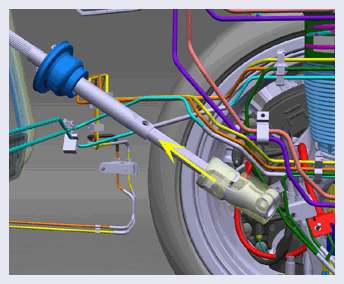 Courtesy of TESLA, INC. Courtesy of TESLA, INC.
|
- Install a new bolt and a new nut that attach the lower steering column intermediate shaft to the upper shaft. (torque 50 N.m).
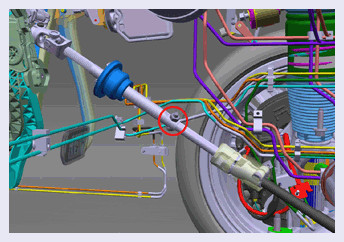 Courtesy of TESLA, INC. Courtesy of TESLA, INC.
|
- Slide the lower portion of the lower steering column intermediate shaft down and onto the steering rack input shaft.
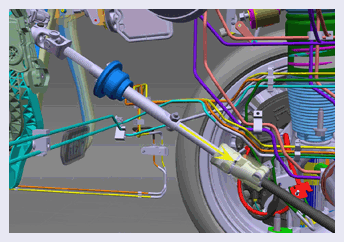 Courtesy of TESLA, INC. Courtesy of TESLA, INC.
|
- Remove the steering wheel holder from the steering wheel.
- Turn the steering wheel so that the bolt that attaches the lower steering column intermediate shaft to the steering rack can be installed.
- Install a new bolt that attaches the lower steering column intermediate shaft to the steering rack (torque 49 N.m).
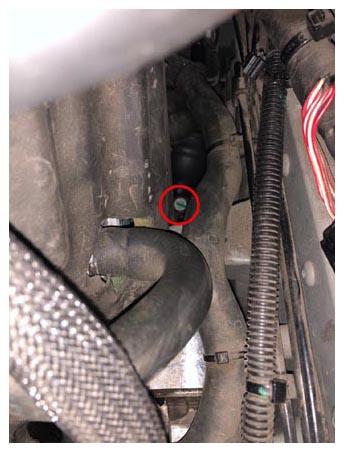 Courtesy of TESLA, INC. Courtesy of TESLA, INC.
|
- Reconnect 12V power. See Disconnect 12V Power
.
- Install the underhood storage unit. See Underhood Storage Unit (Remove and Install)
.
- Position the particulate filter housing on the vehicle, and then install the tabs that attach the housing to the vehicle.
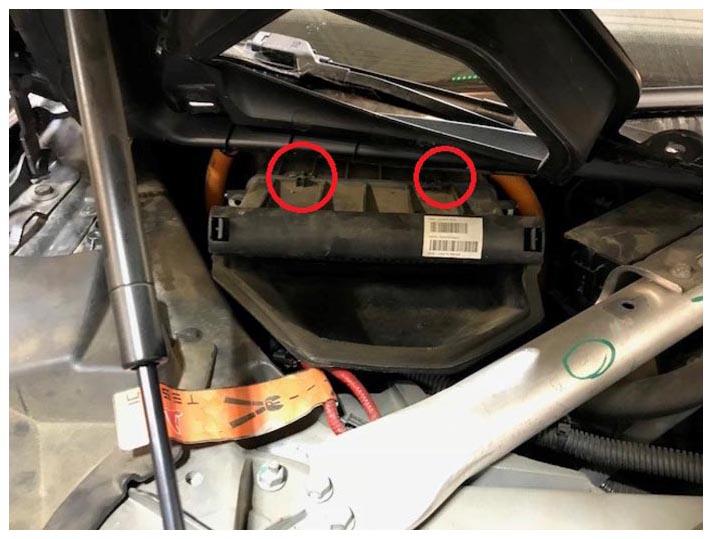 Courtesy of TESLA, INC. Courtesy of TESLA, INC.
|
- Install the bolts (x2) that attach the particulate filter housing to the vehicle (torque 1.5 N.m).
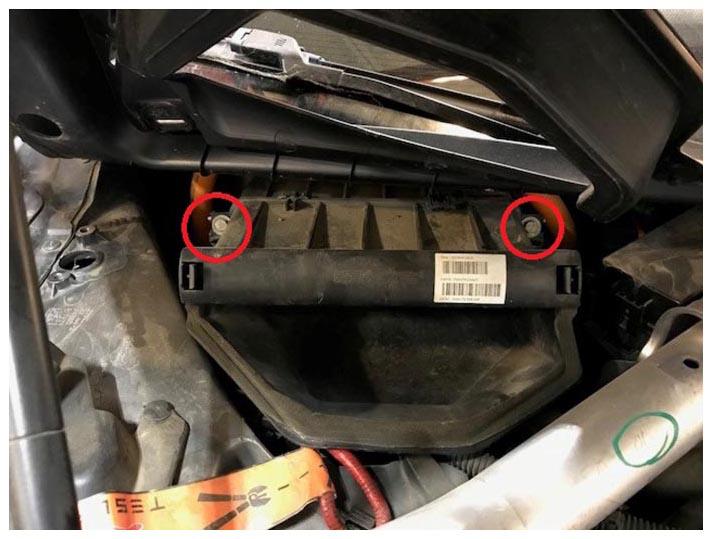 Courtesy of TESLA, INC. Courtesy of TESLA, INC.
|
- Install the clips that attach the RH side of the cowl screen panel to the vehicle.
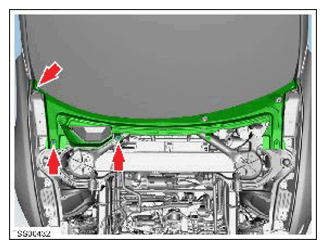 Courtesy of TESLA, INC. Courtesy of TESLA, INC.
|
- Install the particulate filter. See Filter - Particulate (Remove and Replace)
.
- Install the LH and RH underhood aprons. See Underhood Apron - LH (Remove and Replace)
.
- Install the rear underhood apron. See Underhood Apron - Rear (Remove and Replace)
.
- If the vehicle is configured with a Bosch steering rack, perform these additional steps, otherwise go to step 18.
- Connect a laptop with Toolbox 3 to the vehicle. See Toolbox 3 (Connect and Disconnect)
.
- Unlock the vehicle gateway. See Gateway Unlock
.
- In Toolbox 3, click the Actions
tab, type "Calibrate-Steering-Column" into the search field, click PROC_SUN_X_CALIBRATE-STEERING-COLUMN
, click Run
, and allow the routine to complete.
- Once all Toolbox 3 routines have been completed, disconnect the laptop with Toolbox 3 from the vehicle. See Toolbox 3 (Connect and Disconnect)
.
- Perform a lock-to-lock angle test. See Lock To Lock-Angle Test .
- With the vehicle in Park, tires touching the ground, and brake pedal depressed, perform 4 lock-to-lock steering inputs, noting any friction, grinding, or other abnormal sensations from the steering wheel. Repeat this test with the brake pedal released.
- Raise the vehicle slightly so that the tires are off the ground.
- With the vehicle in Park and the brake pedal released, perform 4 lock-to-lock steering inputs, noting any friction, grinding, or other abnormal sensations from the steering wheel. If any concerns were detected while performing the previous steering sweeps, perform further diagnosis to identify the cause for these concerns.