- Remove the center underhood apron Underhood Apron - Rear (Remove And Replace)
.
- Identify the date of manufacture and refer to the applicable wiring diagram:
- Left-hand drive vehicles built through 16 September 2015
- Left-hand drive vehicles built after 17 September 2015
- Right-hand drive vehicles built through 27 May 2015
- Right-hand drive vehicles built after 28 May 2015
- Remove the cover from fuse box.
- Remove the fuse:
- Left-hand drive vehicles built through 16 September 2015: fuse F51
- Left-hand drive vehicles built after 17 September 2015: fuse F235
- Right-hand drive vehicles built through 27 May 2015: fuse F51
- Right-hand drive vehicles built after 28 May 2015: fuse F235
CAUTION:
The 12V battery is not supported when the fuse is disconnected. If the fuse (F51 or F235) is disconnected for more than 15 minutes, connect a float charger to the 12V battery.
CAUTION:
Failure to remove the fuse can result in damage to the SIM card and/or the MCU.
NOTE:
Fuse F51
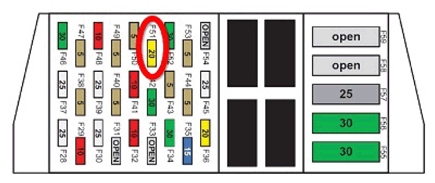 Courtesy of TESLA, INC. Courtesy of TESLA, INC.
|
NOTE:
Fuse F235
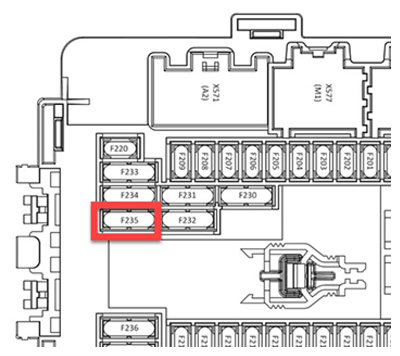 Courtesy of TESLA, INC. Courtesy of TESLA, INC.
|
- Pull down the front of the storage compartment beneath the touchscreen.
- Release the SIM extender from the bottom of the MCU.
CAUTION:
Do not attempt to completely remove the SIM extender from the vehicle.
NOTE:
The SIM extender is attached to the bottom of the MCU with Dual Lock.
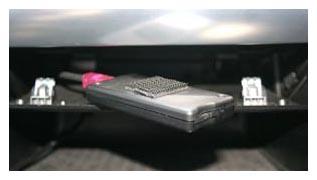 Courtesy of TESLA, INC. Courtesy of TESLA, INC.
|
- Use a pen or a small pick to push the button on the SIM extender. This releases the tray that holds the SIM card from the extender. Remove the tray from the SIM extender.
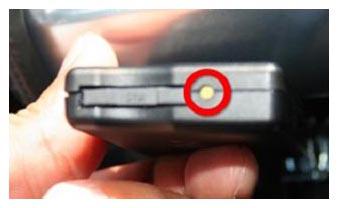 Courtesy of TESLA, INC. Courtesy of TESLA, INC.
|
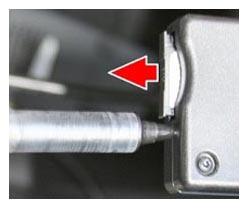 Courtesy of TESLA, INC. Courtesy of TESLA, INC.
|
- Remove the SIM card from the tray.
- Destroy the SIM card by cutting the card in half through the center of the gold pads, and then cut each piece into half, resulting in 4 pieces.
CAUTION:
It is mandatory to destroy the SIM card to protect user data.