- Prepare the target point. <Ref. to
INSPECTION , Rearview Camera System.>
- Turn the ignition switch to ACC.
- Press the button (b) twice with the button (a) pressed.
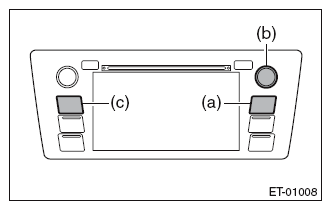 Courtesy of SUBARU OF AMERICA, INC.
NOTE:
Pressing the button (c) for 3 seconds or more, or turning the ignition switch from the OFF to ACC position can exit the diagnostic mode.
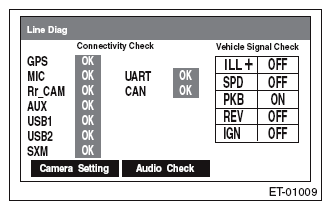
- {Line Diag} screen is displayed.
- Touch {Camera Setting} on the {Line Diag} screen.
 Courtesy of SUBARU OF AMERICA, INC.
NOTE:
GPS is displayed only for the navigation system.
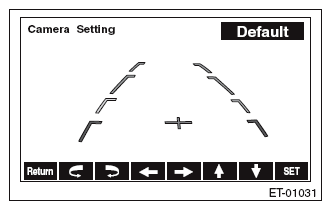
- The display will switch to the rear camera marker selection mode screen.
- Touch the adjustment keys on the display screen to adjust the marker line.
 Courtesy of SUBARU OF AMERICA, INC.
- Touch {SET} to store the marker line setting information.
NOTE:
When {Return} is touched, the setting is not stored and the display switches to the {Line Diag} screen.
- After the setting is completed, confirm that the marker line position is correctly adjusted.