LEMON Manuals: Even more car manuals for everyone
Home >> Subaru >> 2013 >> Impreza Base, 4D Sedan, Automatic CVT Trans >> Repair and Diagnosis >> Brakes >> Traction Control >> Vehicle Dynamics Control System (Except WRX) >> VDC OFF Switch >> Removal

VDC OFF Switch: Removal

  1. Remove the cover assembly - instrument panel LWR driver.
    CAUTION: When removing the cover assembly - instrument panel LWR driver, be sure to pull it toward you. If attempting to remove by turning it upward, the claws may be damaged.
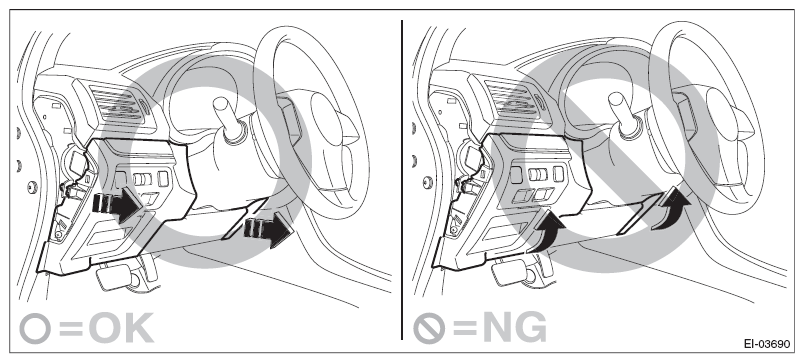
    Fig 1: Identifying Proper And Improper Way Of Removing Instrument Panel LWR Driver Cover Assembly
    G08549807Courtesy of SUBARU OF AMERICA, INC.
    1. Remove the clips, and remove the cover - instrument panel side LH.
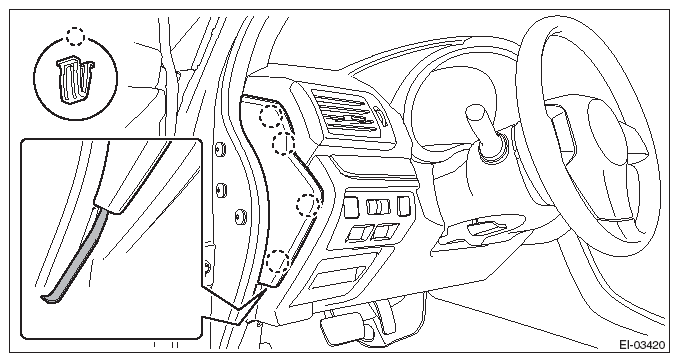
      Fig 2: Removing Instrument Panel Side Cover (LH)
      G08316328Courtesy of SUBARU OF AMERICA, INC.
      NOTE: Using a plastic remover, open the cover - instrument panel side LH.
    2. Remove the screws and release the clips and claws.
    3. Disconnect the harness connectors, and remove the cover assembly - instrument panel LWR driver OUT.
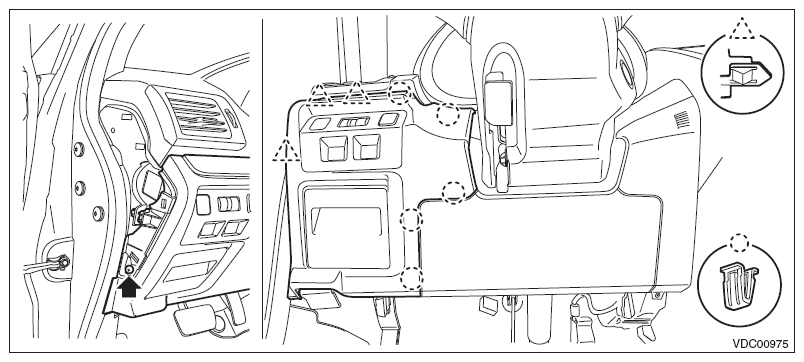
      Fig 3: Identifying Instrument Panel LWR Driver Cover Assembly Screws, Clips And Claws
      G08314759Courtesy of SUBARU OF AMERICA, INC.
  2. Remove the screws and release the claws, then detach the cover.
    Fig 4: Identifying Instrument Panel LWR Driver Cover Assembly Screws And Claws
    G08314760Courtesy of SUBARU OF AMERICA, INC.
  3. Release the claws and remove the VDC OFF switch.
    Fig 5: Identifying VDC OFF Switch Claws
    G08314761Courtesy of SUBARU OF AMERICA, INC.