Entertainment System - Entertainment: Audio: Removal
- Disconnect the ground cable from the battery.
- Remove the console box. <Ref. to REMOVAL
, Console Box
.>
- Remove the console front panel. <Ref. to REMOVAL
, Center Console
.>
- Remove the console side garnish. <Ref. to REMOVAL
, Center Console
.>
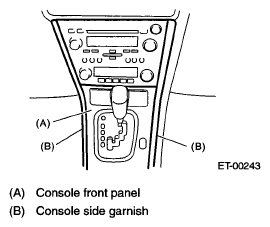 Courtesy of SUBARU OF AMERICA, INC.
- Remove the screws, and partially pull the audio out from center console.
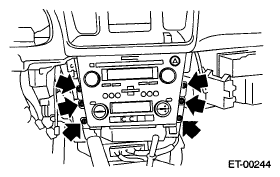 Courtesy of SUBARU OF AMERICA, INC.
- Disconnect the harness connector and antenna feeder cord, and then remove the audio.