To remove
- Remove the battery cover.
- Remove the battery.
- Remove the maxi fuse holder.
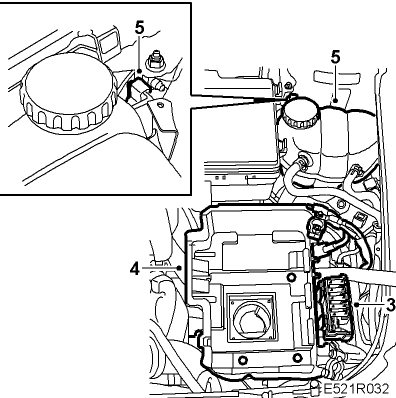 Courtesy of SAAB-SCANIA OF AMERICA, INC.
- Remove the battery tray.
- Remove the clip and twist out the coolant reservoir.
- Unplug the connector.
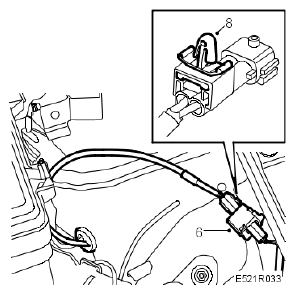 Courtesy of SAAB-SCANIA OF AMERICA, INC.
- Remove the clip from the bracket.
- Remove the clip from the connector.
- Raise the car and remove the wheel.
- Clean the area round the wheel sensor using a soft wire brush.
- Undo the wheel sensor retaining bolt and remove the wheel sensor.
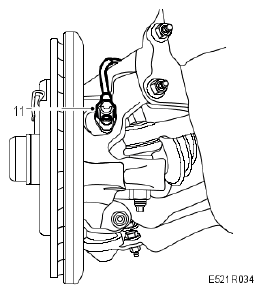 Courtesy of SAAB-SCANIA OF AMERICA, INC.
- Remove the grommet and withdraw the lead.
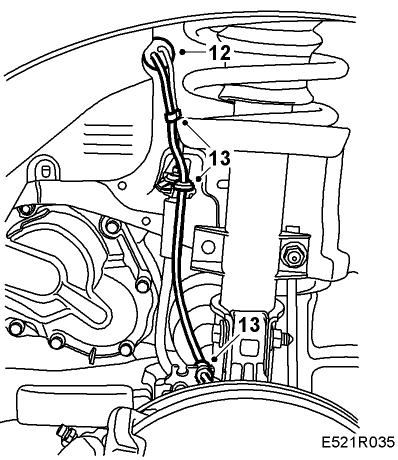 Courtesy of SAAB-SCANIA OF AMERICA, INC.
- Detach the lead from the clips and lift out the sensor.