DTC 21 - "G" Sensor
- Disconnect "G" sensor connector. Connect positive lead of a 7.0-7.5 voltage supply (dry cell batteries) to "G" sensor terminal No. 1 (Black/White wire). See Fig 1
.
- Connect negative lead of voltage supply to "G" sensor terminal No. 3 (Black wire). Connect voltmeter between "G" sensor terminal No. 2 (White wire) and "G" sensor case. With "G" sensor in normal level position, voltage should be 1.1-1.5 volts. With "G" sensor turned 90 degrees (bracket up), voltage reading should be 4.6-5.0 volts. If voltage reading is not as specified, replace "G" sensor.
- Check continuity between "G" sensor and RWAL ECU. See "G" SENSOR HARNESS CONTINUITY CHECK
table. Inspect and repair circuits as needed.
- If after all tests have been completed system still does not function properly, substitute known-good RWAL ECU and retest system.
"G" SENSOR HARNESS CONTINUITY CHECK
| RWAL ECU
Terminal No. |
Wire Color |
"G" Sensor Terminal No. |
| 5 |
Black |
3 |
| 6 |
White |
2 |
| 16 |
Black/White |
1 |
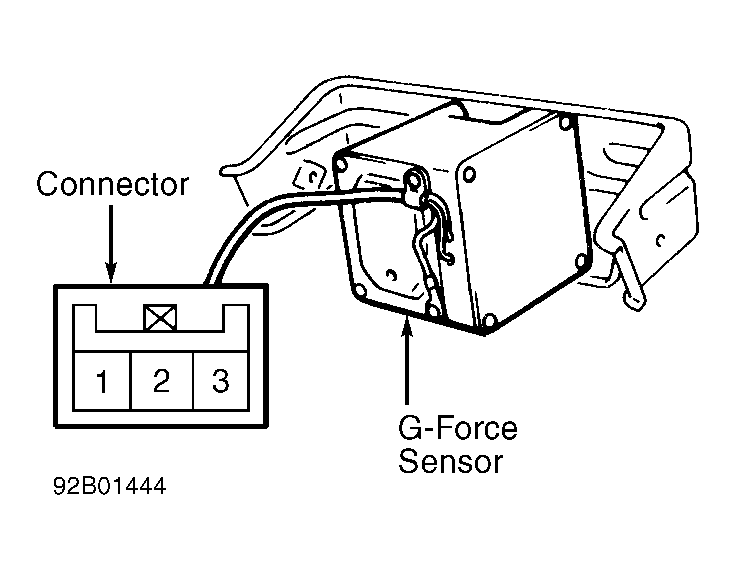 Courtesy of MITSUBISHI MOTOR SALES OF AMERICA.