Tweeter Hole Cover Removal/Installation: Driver-side
- Insert your hand from under the driver-side lower panel and while pressing the tweeter hole cover tab in the directions of arrows (1) shown in the figure, press out the tweeter hole cover in the direction of arrow (2) and detach the tweeter hole cover tab from the dashboard.
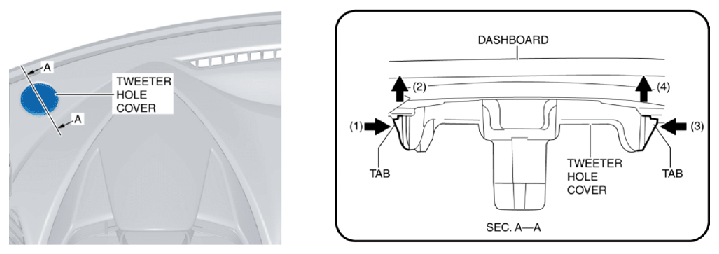 Courtesy of ABLE BODY CORP.
- Insert your hand from under the driver-side lower panel and while pressing the tweeter hole cover tab in the directions of arrows (3) shown in the figure, press out the tweeter hole cover in the direction of arrow (4) and detach the tweeter hole cover tab from the dashboard.
- Remove the tweeter hole cover.
- Install in the reverse order of removal.