Microphone Removal/Installation
- Disconnect the negative battery cable. (See NEGATIVE BATTERY CABLE DISCONNECTION/CONNECTION [SKYACTIV-G 2.5]
.)
- Remove the front map light. (See MAP LIGHT REMOVAL/INSTALLATION
.)
- While pressing tabs A of the voice recognition microphone in the direction of the arrows (1) shown in the figure using a tape-wrapped flathead screwdriver, pull the voice recognition microphone in the direction of the arrow (2) shown in the figure to detach tabs A of the voice recognition microphone from the front map light.
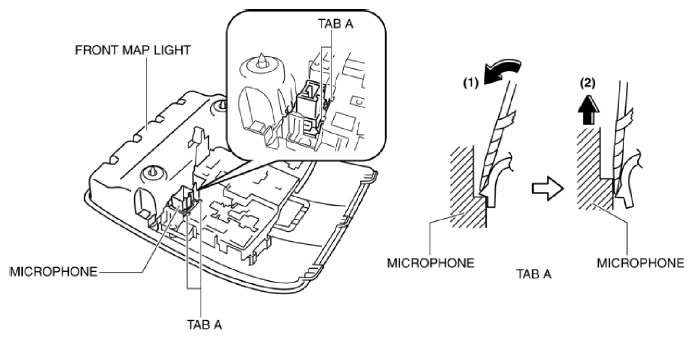 Courtesy of MAZDA MOTORS CORP.
- While pulling tab B of the voice recognition microphone in the direction of the arrow (1) shown in the figure, pull the voice recognition microphone in the direction of the arrow (2) shown in the figure to detach tab B of the voice recognition microphone from the front map light.
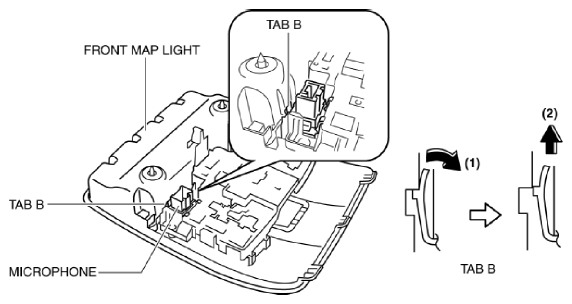 Courtesy of MAZDA MOTORS CORP.
- Remove the microphone.
- Install in the reverse order of removal.