With Steering Shift Switch
- Switch the ignition off.
- Disconnect the negative battery cable and wait for 1 min or more. (Refer to NEGATIVE BATTERY CABLE DISCONNECTION/CONNECTION [SKYACTIV-G 2.0, SKYACTIV-G 2.5]
.)
- Remove the driver-side air bag module. (Refer to DRIVER-SIDE AIR BAG MODULE REMOVAL [TWO-STEP DEPLOYMENT CONTROL SYSTEM]
.) (Refer to DRIVER-SIDE AIR BAG MODULE INSTALLATION [TWO-STEP DEPLOYMENT CONTROL SYSTEM]
.) (Refer to DRIVER-SIDE AIR BAG MODULE REMOVAL [STANDARD DEPLOYMENT CONTROL SYSTEM]
.) (Refer to DRIVER-SIDE AIR BAG MODULE INSTALLATION [STANDARD DEPLOYMENT CONTROL SYSTEM]
.)
- Remove the steering wheel. (Refer to STEERING WHEEL AND COLUMN REMOVAL/INSTALLATION
.)
- Remove the screws.
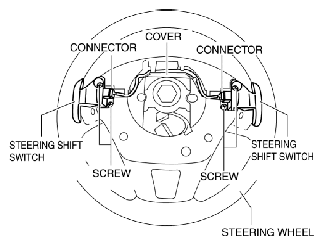 Courtesy of ABLE BODY CORP.
- Disconnect the connectors.
- While pressing the pin tabs in the direction of arrows (1) shown in the figure, press the pin in the direction of arrow (2) to detach the cover pin from the steering wheel.
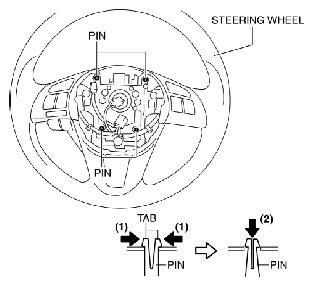 Courtesy of ABLE BODY CORP.
- Using a tape-wrapped flathead screwdriver, press the cover tabs in the direction of the arrows shown in the figure to detach the cover tabs from the steering wheel.
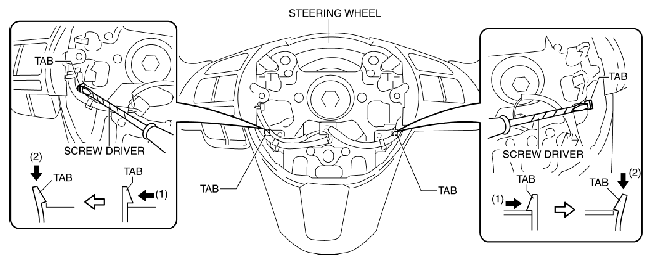 Courtesy of ABLE BODY CORP.
- Remove the cover.
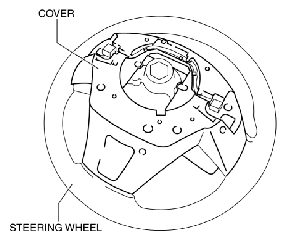 Courtesy of ABLE BODY CORP.
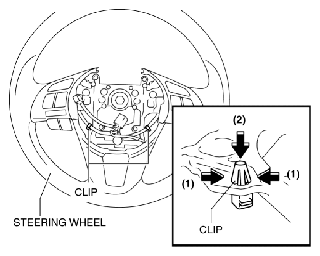
- While pressing the clip tabs in the direction of the arrows (1) shown in the figure, press the clip in the direction of the arrow (2) to detach the clip tabs from the steering wheel.
 Courtesy of ABLE BODY CORP.
- Detach the clip.
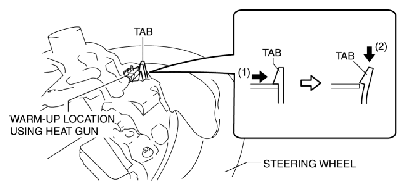
- Warm up the shaded area shown in the figure and soften the hard plastic area of the steering wheel using a heat gun.
- While pressing the tabs of the steering switch in the direction of the arrows (1) shown in the figure, press the steering switch in the direction of the arrow (2) to detach the tabs of the steering switch from the steering wheel.
 Courtesy of ABLE BODY CORP.
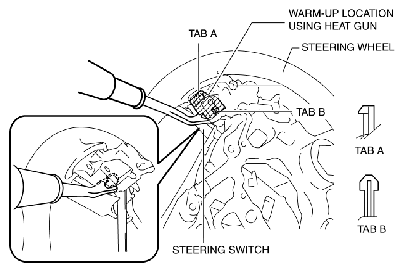
- Warm up the shaded area shown in the figure and soften the hard plastic area of the steering wheel using a heat gun.
- Insert a fastener remover into the position shown in the figure.
 Courtesy of ABLE BODY CORP.
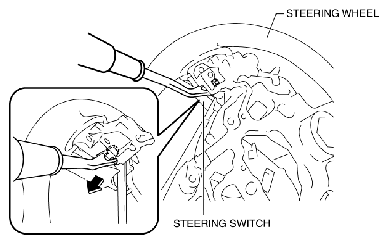
- Move the fastener remover straight in the direction shown in the figure and remove the tabs of the steering switch from the steering wheel.
CAUTION:
- When removing the pins of the steering switch, pull them out straight. If the fastener remover is moved at an angle, the pins could be damaged.
NOTE:
- Because the pins of the steering switch are installed to the hard plastic area of the steering wheel, the engagement is strong.
 Courtesy of ABLE BODY CORP.
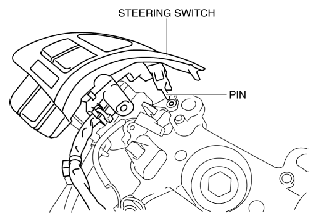
- Remove the steering switch while detaching the pin and tabs of the steering wheel.
 Courtesy of ABLE BODY CORP.
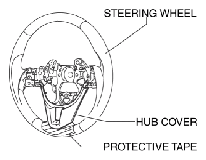
- Affix protective tape shown in the figure.
 Courtesy of ABLE BODY CORP.
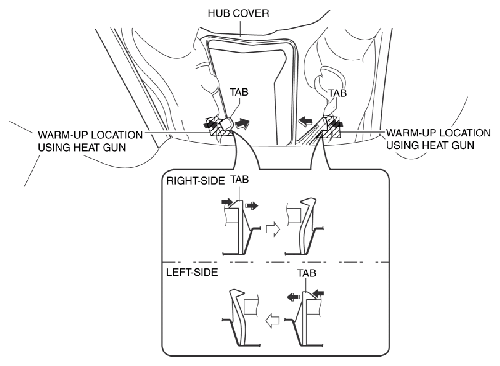
- Warm up the shaded area shown in the figure and soften the hard plastic area of the steering wheel using a heat gun.
- Press the tab in the direction of arrow shown in the figure, detach it.
 Courtesy of ABLE BODY CORP.
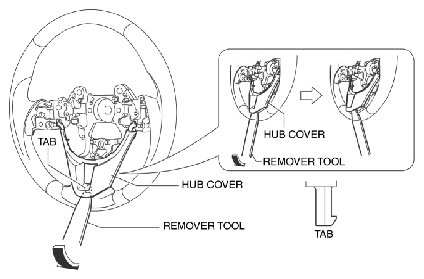
- Insert a plastic remover tool, move it in the direction of the arrow shown in the figure, detach the tabs.
 Courtesy of ABLE BODY CORP.
- Insert a remover tool, move it in the direction of the arrow shown in the figure, remove the pin.
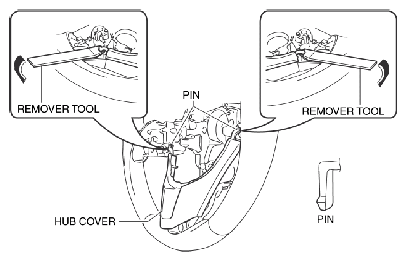 Courtesy of ABLE BODY CORP.
- Remove the hub cover.
- Install in the reverse order of removal.