Using M-MDS
- Fully lower the driver-side door glass.
- Connect the M-MDS to the DLC-2.
- Pull out the M-MDS cable from the door glass opening and set the M-MDS outside the vehicle.
CAUTION:
- Protect the cable and body contact area with a clean rag, otherwise they could be damaged.
- After the vehicle is identified, select the following items from the initialization screen of the M-MDS.
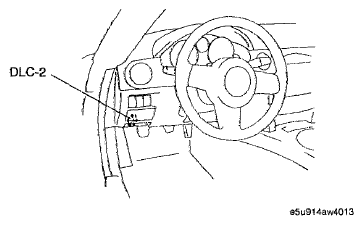 Courtesy of MAZDA MOTORS CORP.
- When using the IDS (laptop PC)
- Select "BODY"
- Select "SECURITY"
- Select "PATS functions"
- When using the PDS (Pocket PC)
- Select "Programming".
- Select "PATS functions"
- Then, select items from the screen menu in the following order.
- Select "Program Additional Card Key".
- Perform the security access according to the directions on the M-MDS screen.