Information Display Removal/Installation
- Disconnect the negative battery cable.
- Remove the upper column cover. (See COLUMN COVER REMOVAL/INSTALLATION
.)
- Remove the instrument cluster. (See INSTRUMENT CLUSTER REMOVAL/INSTALLATION .)
- Remove the switch panel. (See SWITCH PANEL REMOVAL/INSTALLATION
.)
- Remove the screws.
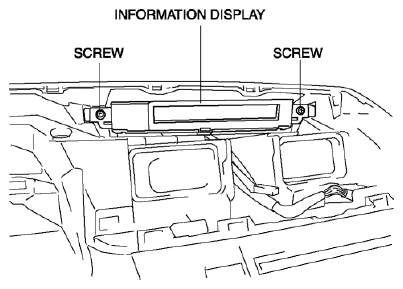 Courtesy of MAZDA MOTORS CORP.
- Press the instrument cluster in the direction of the arrow shown below while avoiding the tabs and pull out it.
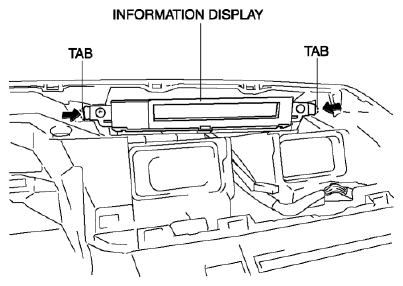 Courtesy of MAZDA MOTORS CORP.
- Disconnect the connector.
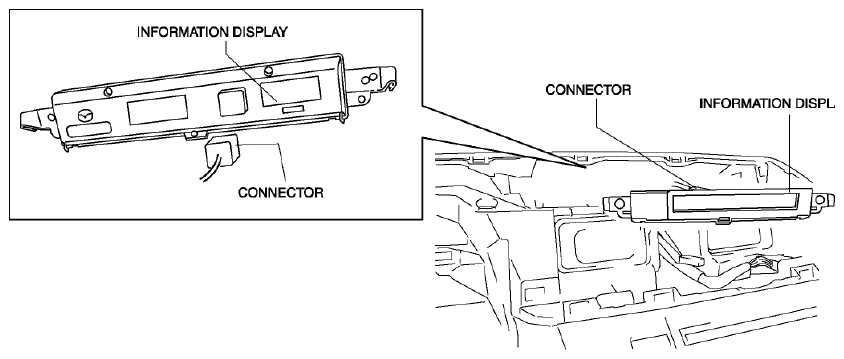 Courtesy of MAZDA MOTORS CORP.
- Remove the information display.
- Install in the reverse order of removal.