DTC Inspection [Immobilizer System (Advanced Keyless Entry And Push Button Start System)]: M-MDS
- Connect the M-MDS to the DLC-2.
- After the vehicle is identified, select the following items from the initialization screen of the M-MDS.
- Using the IDS (laptop PC)
- Select "Self test"
- Select "Modules"
- Select "RKE"
- Using the PDS (Pocket PC):
- Select "Module tests"
- Select "RKE"
- Select "Self test"
- Verify the DTC according to the directions on the screen.
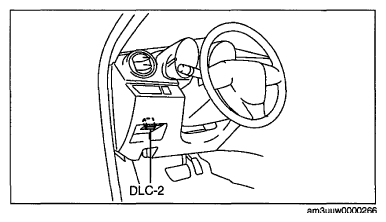 Courtesy of MAZDA MOTORS CORP.
NOTE:
- Because of the possibility that one malfunction cause could result in several DTCs being detected, erase the DTCs after the repair is completed, and then check for DTCs again.
- After completion of repairs, clear all DTCs stored in the keyless control module and PCM. (See
CLEARING DTC [IMMOBILIZER SYSTEM (ADVANCED KEYLESS ENTRY AND PUSH BUTTON START SYSTEM)] .) (See
AFTER REPAIR PROCEDURE [LF, L5]
.) (See
AFTER REPAIR PROCEDURE [L3 WITH TC]
.)