Test No. 1
- Check ROOM fuse (15-amp). If fuse is faulty, replace ROOM fuse (repair circuit if shorted). If fuse is okay, go to next step.
- Remove key from ignition switch. Remove CPU from joint box. Measure voltage at terminal 3B of joint box connector. SeeFig 1
. If battery voltage does not exist, repair wiring between ROOM fuse and CPU. If battery voltage exists, go to next step.
- Check continuity between ground and terminal 3D of joint box connector. If continuity does not exist, repair wiring between CPU and ground. If continuity exists, go to next step.
- Measure voltage at terminal 3N of joint box connector. If battery voltage exists, replace key reminder switch or repair wiring between ROOM fuse and CPU. If battery voltage does not exist, go to next step.
- Open both front doors. Check continuity between ground and terminal 3M of joint box connector. If continuity does not exist, go tostep 7). If continuity exists, go to next step.
- Check continuity between ground and terminal 3H of joint box connector. If continuity does not exist, go to step 8). If continuity exists, go to step 9).
- Remove driver's door switch. Check continuity between door switch terminal and switch body with switch button released. If continuity exists, repair wiring between CPU and door switch. If continuity does not exist, replace door switch.
- Remove front passenger's door switch. Check continuity between door switch terminal and switch body with switch button released. If continuity exists, repair wiring between CPU and door switch. If continuity does not exist, replace door switch.
- Install CPU to joint box. Disconnect CPU 20-pin connector. SeeFig 1
. Open rear door. Check continuity between ground a nd terminal 2D (Red wire) of CPU 20-pin connector. If continuity exists, reconnect CPU 20-pin connector and go to step 11). If continuity does not exist, go to next step.
- Remove door switch from either rear door. Check continuity between door switch terminal and switch body with switch button released. If continuity exists, repair wiring between CPU and door switch. If continuity does not exist, replace door switch. Perform same procedure at other rear door switch.
- Disconnect CPU 16-pin connector. Close trunk and hood. Check continuity between ground and terminal 1D (Green/Red wire) of CPU 16-pin connector. If continuity does not exist, go to next step. If continuity exists, go to step 13).
- Check continuity between ground and terminal 1F (Blue/Red wire) of CPU 16-pin connector. If continuity exists, go to step 14). If continuity does not exist, reconnect CPU 16-pin connector and go to step 15).
- Remove trunk switch from trunk latch assembly. Check continuity between trunk switch connector terminals. With switch lever pushed (trunk closed), continuity should not exist. With switch lever released (trunk open), continuity should exist. If continuity is not as specified, replace trunk switch. If continuity is as specified, repair wiring between CPU and trunk switch.
- Remove hood switch from hood latch assembly. Check continuity between hood switch connector terminals. With switch lever pushed (hood closed), continuity should not exist. With switch lever released (hood open), continuity should exist. If continuity is not as specified, replace hood switch. If continuity is as specified, repair wiring between CPU and hood switch.
- Disconnect CPU 20-pin connector. SeeFig 1
. Ground terminal 2M (Red/Green wire) of CPU 20-pin connector. If security light illuminates, replace CPU. If security light does not illuminate, go to next step.
- Remove instrument cluster. Measure voltage at terminal 1I (Blue/Red wire) of instrument cluster connector No. 1 (White, 14-pin connector). SeeFig 2
. If battery voltage does not exist, repair wiring between ROOM fuse and instrument cluster. If battery voltage exists, go to next step.
- Measure voltage at terminal 1H (Red/Green wire) of instrument cluster connector No. 1. If battery voltage exists, repair wiring between instrument cluster and CPU. If battery voltage does not exist, replace security light.
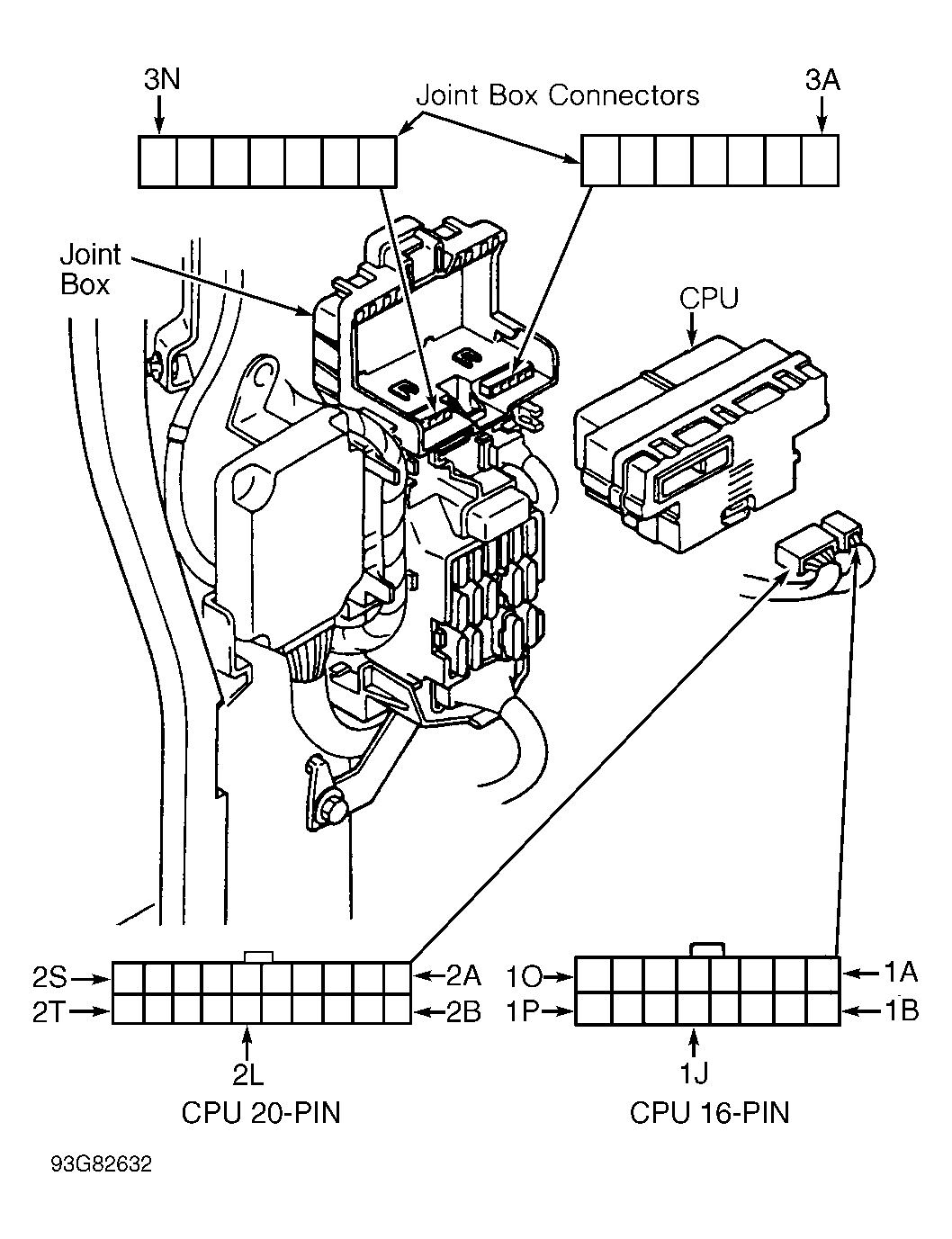 Courtesy of MAZDA MOTORS CORP.
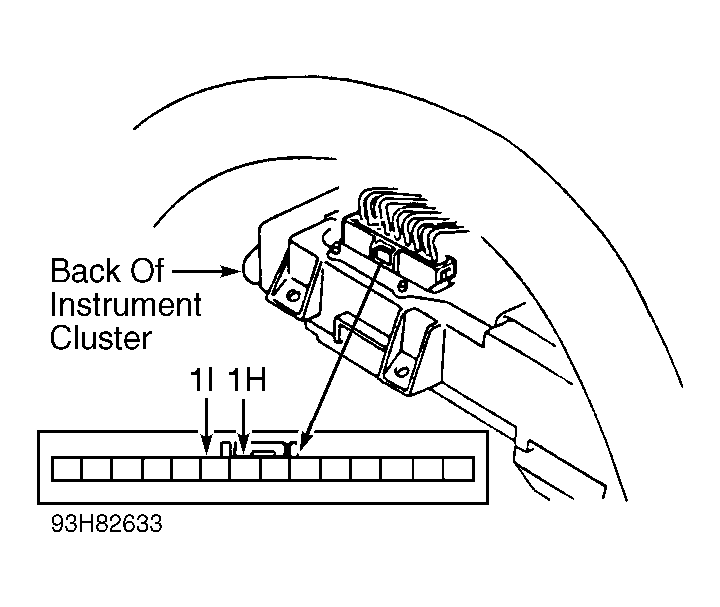 Courtesy of MAZDA MOTORS CORP.