Removal And Installation
- Apply the parking brake and move the shift lever to NEUTRAL.
- Disconnect the battery negative cable. For additional information, refer to BATTERY, MOUNTING AND CABLES
article.
- Remove the shift lever trim ring.
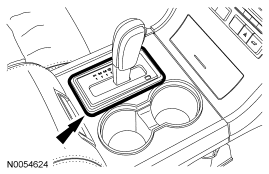 Courtesy of FORD MOTOR CO.
- Remove the front floor console finish panel.
- Remove the lower instrument cluster finish panel in the following sequence.
- Remove the 2 lower instrument cluster finish panel screws.
- Pull out on the panel to disengage the clips.
- Disconnect the electrical connectors.
- Depress the 4 tabs and remove the traction control switch assembly.
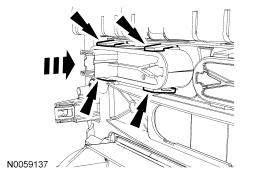 Courtesy of FORD MOTOR CO.
- To install, reverse the removal procedure.