Test C: Generic Electronic Module (Gem) Does Not Respond To NGS Tester
- Turn ignition off. Disconnect GEM 26-pin connector. GEM is mounted on fuse block, below left side of instrument panel. See Fig 1. Disconnect NGS tester. Inspect connector GEM connector and Data Link Connector (DLC) for loose, damaged or corroded terminals. Repair as necessary and retest system for normal operation. If connectors are okay, go to next step.
- Measure resistance of Light Blue/White wire between terminal No. 25 at GEM connector and terminal No. 7 and DLC. See Figure and Fig 1. If resistance is less than 5 ohms, go to next step. If resistance is 5 ohms or more, repair open in Light Blue/White wire between GEM connector and DLC. Retest system for normal operation.
- Reconnect GEM connector and NGS tester. Perform data link diagnostic procedure. See DATA LINK DIAGNOSTIC TEST under COMMUNICATION NETWORK DIAGNOSTICS. If GEM responds to NGS tester, system is functioning properly. If GEM does not respond to NGS tester, check power and ground circuits to GEM. See appropriate GROUND DISTRIBUTION or POWER DISTRIBUTION wiring diagrams in SYSTEM WIRING DIAGRAMS article in the WIRING DIAGRAMS section. If fault is found, repair as necessary and retest system for normal operation. If no fault is found, replace GEM and retest system for normal operation.
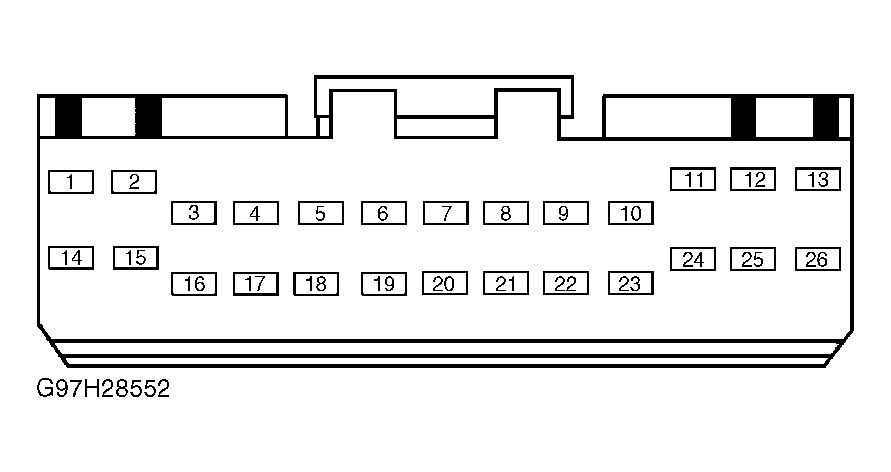 Courtesy of FORD MOTOR CO.