Test B: No Communication With LCM
- Check For PID Data Access
- Turn
ignition switch to RUN position. Using NGS tester, monitor LCM PID
IGN_LC. If NGS tester does not indicate unable to perform test
function, LCM not responding, check ignition status/verify cable
requirements, or check cable connections, go to next step. If NGS
tester indicates unable to perform test function, LCM not responding,
check ignition status/verify cable requirements, or check cable
connections, go to step 16).
- Verify LCM PID IGN_LC Input
- Turn
ignition switch to RUN position. Using NGS tester, monitor LCM PID
IGN_LC while rotating ignition switch through ACCY, OFF and RUN
positions. If NGS tester indicates ACCY while in ACCY position and OFF
in all other positions, replace lighting control module and repeat
DATA LINK DIAGNOSTIC TEST using NGS tester. If NGS tester indicates
ACCY while in RUN position, go to next step. If NGS tester indicates
OFF at all times, go to step 7).
- Check Fuse Output For Voltage
- Remove
instrument panel fuse block fuse No. 5 (10-amp). Turn ignition switch
to RUN position. Using a voltmeter, check voltage between ground and
fuse No. 5 (10-amp) output cavity (right terminal). If voltage is 10
volts or less, go to next step. If voltage is more than 10 volts,
repair open in Red/Yellow wire and repeat DATA LINK DIAGNOSTIC TEST
using NGS tester.
- Check Fuse
- Check condition of
instrument panel fuse No. 5 (10-amp). Remove instrument panel fuse
block fuse No. 5. If fuse is open, go to next step. If fuse is okay,
repair open in Brown/Pink wire between ignition switch and instrument
panel fuse block. Repeat DATA LINK DIAGNOSTIC TEST using NGS
tester.
- Check Red/Yellow Wire For Short To
Ground
- Turn ignition off. Disconnect LCM 22-pin connector
C206 (located behind left side of instrument panel). Disconnect
autolamp light sensor amplifier 5-pin connector C243 (located behind
top left side of instrument panel). Using an ohmmeter, check
resistance between ground and LCM 22-pin connector C206 terminal No.
17 (Red/Yellow wire). See
Fig 1
. If resistance is
less than 20 ohms, go to next step. If resistance is 20 ohms or more,
repair short to ground in Red/Yellow wire. Replace fuse No. 5 (10-amp)
and repeat DATA LINK DIAGNOSTIC TEST using NGS tester.
- Check Lighting Control Module (LCM)
-
Reconnect LCM 22-pin connector C206. Using an ohmmeter, check
resistance between ground and fuse No. 5 (10-amp) output cavity (right
terminal). If resistance is less than 20 ohms, go to AUTOLAMP SYSTEMS
article to continue diagnosis. If resistance is 20 ohms or more,
replace lighting control module. Replace fuse No. 5 (10-amp) and
repeat DATA LINK DIAGNOSTIC TEST using NGS tester.
- Check Fuse Output For Voltage
- Remove
instrument panel fuse block fuse No. 4 (10-amp). Turn ignition switch
to RUN position. Using a voltmeter, check voltage between ground and
fuse No. 4 (10-amp) output cavity (right terminal). If voltage is more
than 10 volts, go to next step. If voltage is 10 volts or less, go to
step 9).
- Check Black/Pink Wire For Voltage
-
Turn ignition off. Disconnect LCM 12-pin connector C208 (located
behind left side of instrument panel). Turn ignition switch to RUN
position. Using a voltmeter, check voltage between ground and LCM
12-pin connector C208 terminal No. 2 (Black/Pink wire). See
Fig 2
. If voltage is more
than 10 volts, replace lighting control module and repeat DATA LINK
DIAGNOSTIC TEST using NGS tester. If voltage is 10 volts or less,
repair open in Black/Pink wire and repeat DATA LINK DIAGNOSTIC TEST
using NGS tester.
- Check Fuse
- Check condition of
instrument panel fuse No. 4 (10-amp). Remove instrument panel fuse
block fuse No. 4. If fuse is open, go to next step. If fuse is okay,
repair open in Black/Light Green wire between ignition switch and
instrument panel fuse block. Repeat DATA LINK DIAGNOSTIC TEST using
NGS tester.
- Check Driver Door Lock Switch
- Turn
ignition off. Disconnect driver door lock switch connector C505. Using
an ohmmeter, check resistance between ground and LCM 12-pin connector
C208 terminal No. 2 (Black/Pink wire). See
Fig 2
. If resistance is
10 k/ohms or less, go to next step. If resistance is more than 10
k/ohms, replace driver door lock switch. Replace fuse No. 4 (10-amp)
and repeat DATA LINK DIAGNOSTIC TEST using NGS tester.
- Check Passenger Door Lock Switch
-
Turn ignition off. Disconnect passenger door lock switch connector
C602. Using an ohmmeter, check resistance between ground and LCM
12-pin connector C208 terminal No. 2 (Black/Pink wire). See
Fig 2
. If resistance is
10 k/ohms or less, go to next step. If resistance is more than 10
k/ohms, replace passenger door lock switch. Replace fuse No. 4
(10-amp) and repeat DATA LINK DIAGNOSTIC TEST using NGS tester.
- Check Passenger Window Switch
-
Disconnect passenger window switch connector C600. Using an ohmmeter,
check resistance between ground and LCM 12-pin connector C208 terminal
No. 2 (Black/Pink wire). See
Fig 2
. If resistance is
10 k/ohms or less, go to next step. If resistance is more than 10
k/ohms, replace passenger window switch. Replace fuse No. 4 (10-amp)
and repeat DATA LINK DIAGNOSTIC TEST using NGS tester.
- Check Left Rear Window Switch
-
Disconnect left rear window switch connector C711. Using an ohmmeter,
check resistance between ground and LCM 12-pin connector C208 terminal
No. 2 (Black/Pink wire). See
Fig 2
. If resistance is
10 k/ohms or less, go to next step. If resistance is more than 10
k/ohms, replace left rear window switch. Replace fuse No. 4 (10-amp)
and repeat DATA LINK DIAGNOSTIC TEST using NGS tester.
- Check Right Rear Window Switch
-
Disconnect right rear window switch connector C809. Using an ohmmeter,
check resistance between ground and LCM 12-pin connector C208 terminal
No. 2 (Black/Pink wire). See
Fig 2
. If resistance is
10 k/ohms or less, go to next step. If resistance is more than 10
k/ohms, replace right rear window switch. Replace fuse No. 4 (10-amp)
and repeat DATA LINK DIAGNOSTIC TEST using NGS tester.
- Check Black/Pink Wire For Short To
Ground
- Using an ohmmeter, check resistance between ground and
LCM 12-pin connector C208 terminal No. 2 (Black/Pink wire). See
Fig 2
. If resistance is
10 k/ohms or less, repair short to ground in Black/Pink wire and
repeat DATA LINK DIAGNOSTIC TEST using NGS tester. If resistance is
more than 10 k/ohms, replace lighting control module and repeat DATA
LINK DIAGNOSTIC TEST using NGS tester.
- Check Black Wires For Open
-
Disconnect LCM 22-pin connector C206, 13-pin connector C207, and
13-pin connector C211 (located behind left side of instrument panel).
Using an ohmmeter, check resistance between ground and LCM 22-pin
connector C206 terminal No. 13 (Black wire). See
Fig 1
. Check resistance
between ground and LCM 13-pin connector C207 terminal No. 1 (Black
wire). See Fig 3
.
Check resistance between ground and LCM 13-pin connector C211 terminal
No. 9 (Black wire). See
Fig 4
. If all resistance
readings are less than 5 ohms, go to next step. If any resistance
reading is 5 ohms or more, repair open in appropriate Black wire(s)
and repeat DATA LINK DIAGNOSTIC TEST using NGS tester.
- Check Black/Light Blue Wire For Open
-
Using an ohmmeter, check resistance between ground and LCM 13-pin
connector C207 terminal No. 15 (Black/Light Blue wire). See
Fig 3
. If resistance is
less than 5 ohms, go to MODULE COMMUNICATIONS NETWORK article to
diagnose network concern. If resistance is 5 ohms or more, repair open
in Black/Light Blue wire and repeat DATA LINK DIAGNOSTIC TEST using
NGS tester.
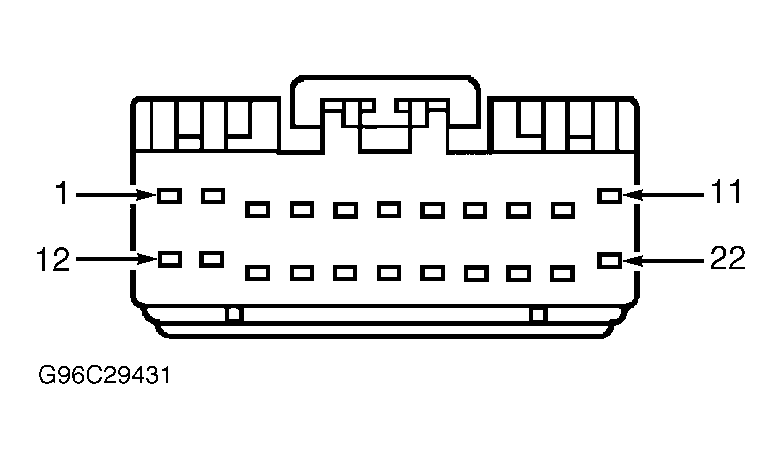 Courtesy of FORD MOTOR CO.
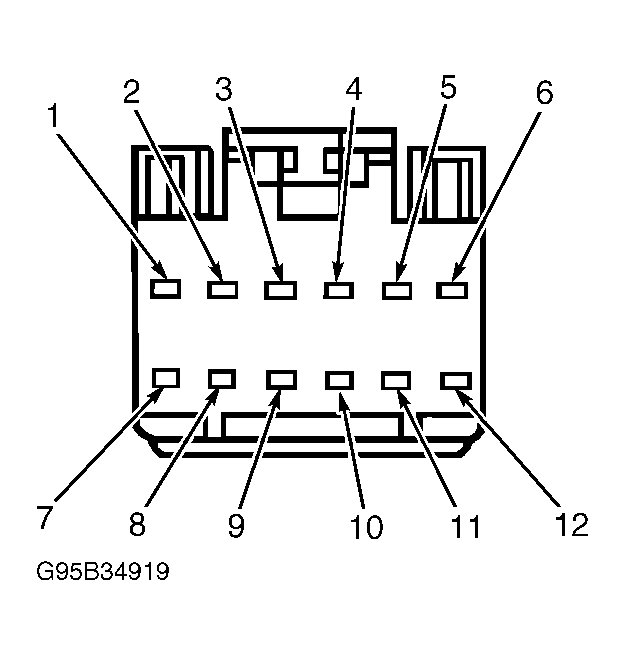 Courtesy of FORD MOTOR CO.
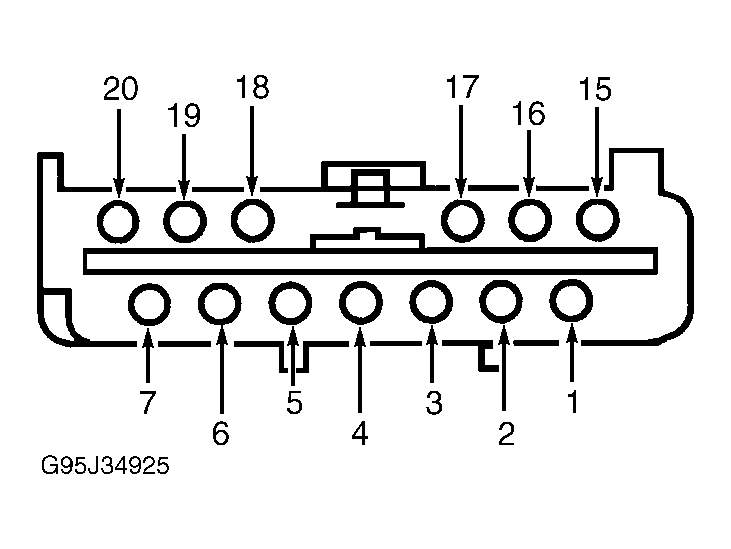 Courtesy of FORD MOTOR CO.
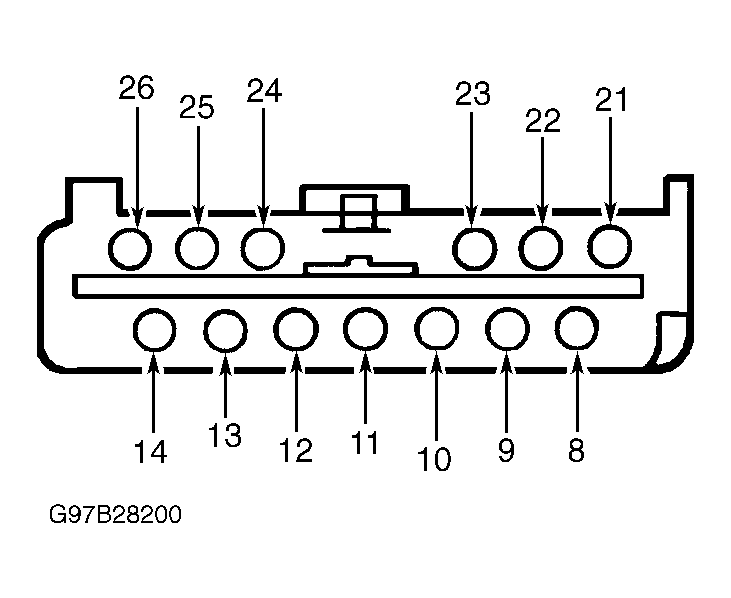 Courtesy of FORD MOTOR CO.