Navigation Ecu: Installation
- INSTALL NO. 2 DISC PLAYER BRACKET
- Install the No. 2 disc player bracket with the 2 screws.
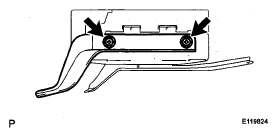 Courtesy of © TOYOTA, LICENSE AGREEMENT TMS1002
- INSTALL DISC PLAYER BRACKET
- Install the disc player bracket with the 2 screws.
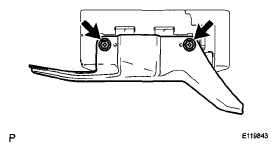 Courtesy of © TOYOTA, LICENSE AGREEMENT TMS1002
- INSTALL NAVIGATION ECU
- Install the navigation ECU with the 3 nuts.
- Connect each connector.
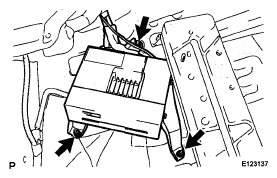 Courtesy of © TOYOTA, LICENSE AGREEMENT TMS1002
- INSTALL SIDE DECK TRIM BOX LH
(See
INSTALLATION
)
- INSTALL SIDE DECK TRIM BOX RH
- INSTALL REAR FLOOR FINISH PLATE
(See
INSTALLATION
)
- INSTALL NO. 3 DECK BOARD SUB-ASSEMBLY
(See
INSTALLATION
)
- INSTALL NO. 2 DECK BOARD SUB-ASSEMBLY
(See
INSTALLATION
)
- INSTALL REAR DECK FLOOR BOX
(See
INSTALLATION
)
- INSTALL FRONT DECK FLOOR BOX
(See
INSTALLATION
)
- INSTALL JACK CARRIER ASSEMBLY
(See
INSTALLATION
)
- INSTALL TONNEAU COVER ASSEMBLY
- INSTALL DECK BOARD SUB-ASSEMBLY
(See
INSTALLATION
)
- CONNECT CABLE TO NEGATIVE BATTERY TERMINAL
- PERFORM INITIALIZATION
NOTE:
Some systems need initialization after reconnecting the cable to the negative battery terminal. (See
INITIALIZATION
)