Headlight Dimmer Switch: Installation
- INSTALL HEADLIGHT DIMMER SWITCH
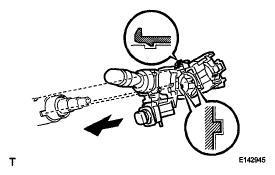
- Insert the headlight dimmer switch into the steering column making sure that the stopper's protrusions and cutout parts align.
 Courtesy of © TOYOTA, LICENSE AGREEMENT TMS1002
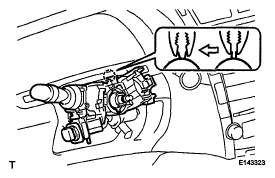
- Install the headlight dimmer switch with the band clamp and claw.
 Courtesy of © TOYOTA, LICENSE AGREEMENT TMS1002
- INSTALL WINDSHIELD WIPER SWITCH ASSEMBLY
 Courtesy of © TOYOTA, LICENSE AGREEMENT TMS1002
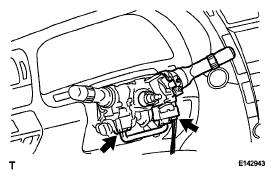
- Attach the claw and install the windshield wiper switch.
- Connect the connectors.
- INSTALL STEERING COLUMN COVER (w/ Driver Monitor Camera)
(See
INSTALLATION
)
- INSTALL STEERING COLUMN COVER (w/o Driver Monitor Camera)
(See
INSTALLATION
)
- INSPECT SPIRAL CABLE SUB- ASSEMBLY
(See
INSPECTION
)
- INSTALL STEERING WHEEL ASSEMBLY
(See
INSTALLATION
)
- INSPECT STEERING WHEEL CENTER POINT
- INSPECT STEERING PAD
(See
INSTALLATION
)
- INSTALL STEERING WHEEL PAD
(See
INSTALLATION
)
- INSTALL NO. 2 STEERING WHEEL COVER LOWER
(See
INSTALLATION
)
- INSTALL SWITCH AND VOLUME CASE
(See
INSTALLATION
)
- CONNECT CABLE TO NEGATIVE BATTERY TERMINAL
NOTE:
- Reset the AUTO TILT AWAY function setting to the previous condition by changing the customize parameter (see
CUSTOMIZE PARAMETERS
).
- When disconnecting the cable, some systems need to be initialized after the cable is reconnected (see
INITIALIZATION
).
- INSTALL BATTERY SERVICE HOLE COVER LH
(See
INSTALLATION
)
- INSTALL LUGGAGE COMPARTMENT MAT SUB-ASSEMBLY
(See
INSTALLATION
)
- CHECK SRS WARNING LIGHT
- Check the SRS warning light (see
DIAGNOSIS SYSTEM
).