Television Display: Installation
- INSTALL TELEVISION DISPLAY BRACKET
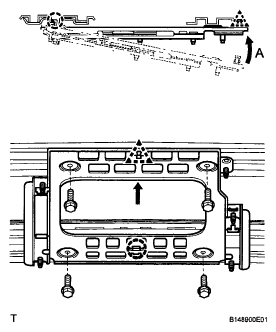
- Attach the claw of the bracket and move the bracket in the direction indicated by arrow A. Then attach a new clip to install the bracket
- Install the 4 bolts.
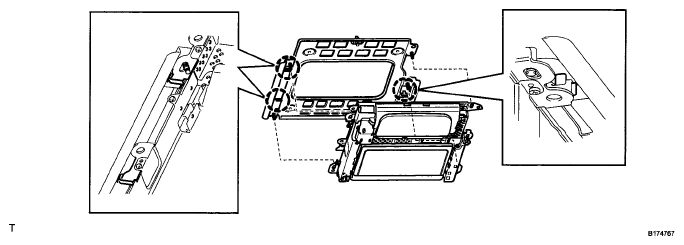
- INSTALL TELEVISION DISPLAY ASSEMBLY
- Attach the 3 claws to install the television display
 Courtesy of © TOYOTA, LICENSE AGREEMENT TMS1002
 Courtesy of © TOYOTA, LICENSE AGREEMENT TMS1002
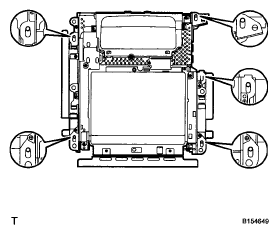
- After installing the television display to the bracket, check that the display's holes and bracket's protrusions are as shown in the illustration
 Courtesy of © TOYOTA, LICENSE AGREEMENT TMS1002
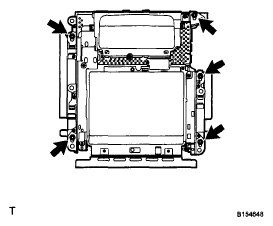
- Install the 5 nuts.
- Connect the connectors.
 Courtesy of © TOYOTA, LICENSE AGREEMENT TMS1002
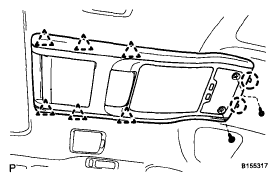
- INSTALL ROOF CONSOLE BOX ASSEMBLY
- w/o Infrared Rays Sensor:
- Connect the connector.
- Attach the 2 claws, and then attach the 6 clips to install the roof console box.
- Install the 2 screws
- w/ Infrared Rays Sensor.
- Connect the 2 connectors.
- Attach the 2 claws, and then attach the 6 clips to install the roof console box.
- Install the 2 screws.
 Courtesy of © TOYOTA, LICENSE AGREEMENT TMS1002
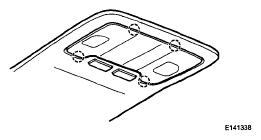
- INSTALL SPOT LIGHT LENS
- Attach the 4 claws to install the lens
- CONNECT CABLE TO NEGATIVE BATTERY TERMINAL
NOTE:
When disconnecting the cable some systems need to be initialized after the cable is reconnected (see
INITIALIZATION
).
 Courtesy of © TOYOTA, LICENSE AGREEMENT TMS1002
- INSTALL BATTERY SERVICE HOLE COVER LH
(See
INSTALLATION
)
- INSTALL LUGGAGE COMPARTMENT MAT SUB-ASSEMBLY
(See
INSTALLATION
)