Smart Key Registration
- Connect the cable of scan tool to the data link connector in driver side crash pad lower panel.
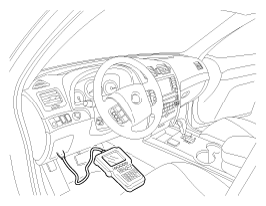 Courtesy of KIA MOTORS AMERICA, INC.
- After IG ON, select vehicle.
- Select the "Smart key system" and "Smart key code saving".
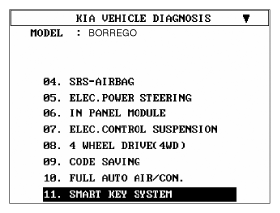 Courtesy of KIA MOTORS AMERICA, INC.
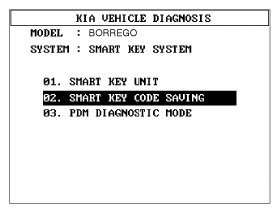 Courtesy of KIA MOTORS AMERICA, INC.
- Insert into key holder one fob key to be learnt and press "Enter".
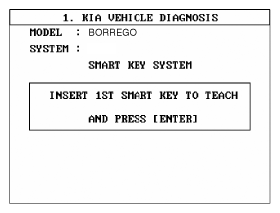 Courtesy of KIA MOTORS AMERICA, INC.
- Input the pin code to learn.
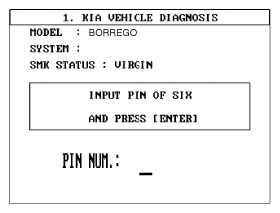 Courtesy of KIA MOTORS AMERICA, INC.
- Start the first key learning.
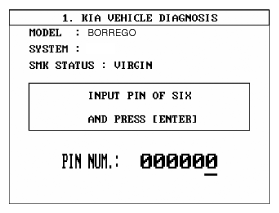 Courtesy of KIA MOTORS AMERICA, INC.
- Complete the first key learning.
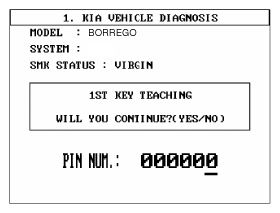 Courtesy of KIA MOTORS AMERICA, INC.
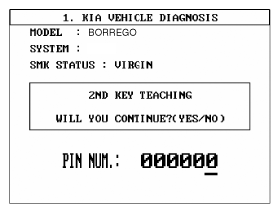
- Start the second key learning.
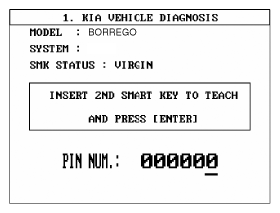 Courtesy of KIA MOTORS AMERICA, INC.
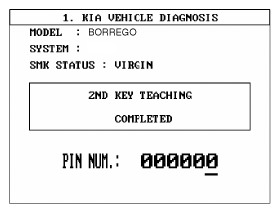
- Complete the second key learning.
 Courtesy of KIA MOTORS AMERICA, INC.
 Courtesy of KIA MOTORS AMERICA, INC.