ESCL Communication Status Check
- Connect the cable of scan tool to the data link connector in driver side crash pad lower panel.
- Select the "STATUS CHECK".
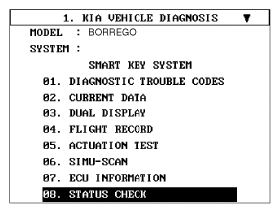 Courtesy of KIA MOTORS AMERICA, INC.
- After IG ON, select the "ESCL COMM. LINE STATUS CHECK".
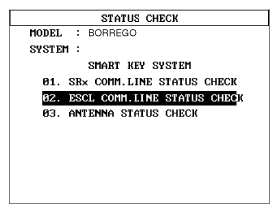 Courtesy of KIA MOTORS AMERICA, INC.
- Check the ESCL communication line with a scanner.
- If the smart key works normally, the communication of ESCL (Electronic Steering Column Lock) is normal.
- If the smart key does not work properly, check the following items.
- The ESCL disconnection or no response
- The ESCL disconnection and ground connector