Test Procedure
- Turn ignition off. Connect Hi-Scan Pro/Kia Data Pro Scan tool or equivalent to OBD-II Data Link Connector. See Figure
. Turn ignition on. Monitor for other DTCs. If DTC P0446 is set, do all repairs associated with that DTC before continuing with this procedure. If no other DTCs are set, go to next step.
- Using Hi-Scan Pro/Kia Data Pro Scan tool or equivalent, monitor FTP sensor output voltage. Voltage should be 2.2-2.8 volts. If voltage is not as specified, go to next step. If voltage is as specified, problem is intermittent, check FTP sensor and ECM for proper harness connections and go to step 9
.
- Turn ignition off. Thoroughly check FTP sensor harness connector terminals for loose, bent, corroded, contaminated, deteriorated or damaged connector terminals. If connector terminals are okay, go to next step. If connector and terminals are faulty, repair or replace as necessary and go to step 9
.
- Disconnect FTP sensor 3-pin harness connector. See Fig 1
. Turn ignition on. Measure voltage between ground and FTP sensor connector terminal No. 2 (Yellow wire). Voltage should be approximately 5 volts. If voltage is as specified, go to next step. If voltage is not as specified, repair open circuit or short circuit as necessary and go to step 9
.
- Turn ignition off. Disconnect ECM harness connector "B" and "C". See Figure
. Turn ignition on. Measure voltage between ground and FTP sensor connector terminal No. 3 (Red wire). Voltage should be below 0.5 volts. If voltage is as specified, go to next step. If voltage is not as specified, repair short circuit as necessary and go to step 9
.
- Turn ignition off. With FTP sensor and ECM harness connectors disconnected, measure resistance between FTP sensor connector terminal No. 3 (Red wire) and ECM connector terminal C26. Also measure resistance between FTP sensor connector terminal No. 2 (Yellow wire) and ECM connector terminal B1. Both resistances should be below one ohm. If resistances are as specified, go to next step. If any resistance is not as specified, repair open or short circuit as necessary and go to step 9
.
- With FTP sensor and E/TCM harness connectors disconnected. Measure resistance between ground and FTP sensor connector terminals No. 3 (Red wire). Resistance should be infinite. If resistances is as specified, temporarily install a Known-good FTP sensor and check for proper operation. If problem is corrected, replace FTP sensor and go to step 9
. If resistance is not as specified, repair short circuit as necessary and go to next step.
- Disconnect Canister Close Valve (CCV) hose from EVAP canister. Blow air into hose and verify air escapes. With CCV 2-pin harness connector disconnected. Connect a fused jumper wire between battery voltage and CCV connector terminal No. 2 (component side). With another fused jumper wire connected to CCV connector terminal No. 1 (component side), apply ground. Blow air into hose removed from EVAP canister and verify air does not escapes from port. Repeat this procedure 4 or 5 times to ensure CCV reliability. If valve is okay, thoroughly check harness connectors terminals for loose, bent or corroded connector terminals between FTP sensor, CCV and ECM. Repair if necessary and go to next step. If valve is faulty, temporarily install a known-good CCV and check for proper operation. If problem is corrected, replace valve and go to next step.
- After repair, return vehicle to original condition. Clear codes using Hi-Scan Pro/Kia Data Pro Scan tool or equivalent. Verify repairs by driving vehicle and monitoring for pending codes. If DTC is set during test drive, follow appropriate DTC test procedure.
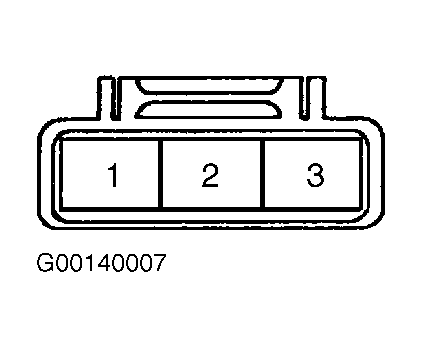 Courtesy of KIA MOTORS AMERICA, INC.