Lock Housing, Steering Column: Removal: Removal
 Courtesy of CHRYSLER GROUP, LLC
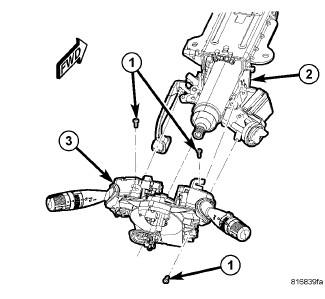
- Access and remove the Steering Column Control Module (SCCM) (3) from the steering column (2). Refer to CLOCKSPRING, REMOVAL
.
 Courtesy of CHRYSLER GROUP, LLC
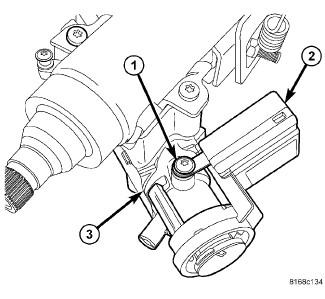
- Remove the screw (1) fastening the SKREEM/WCM (2) to the lock cylinder housing (3).
- Unhook the SKREEM/WCM (2) retainer fingers from the lock cylinder housing (3) and remove it.
 Courtesy of CHRYSLER GROUP, LLC
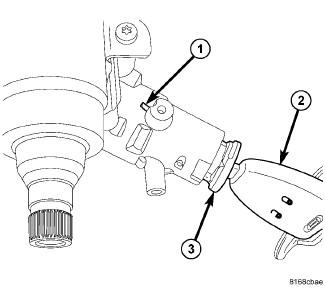
- Insert the key (2) and turn the key cylinder (3) to the RUN position.
- Insert an appropriate tool into the slot (1) formed into the lock cylinder housing depressing the key cylinder retaining tab.
- Pull the key cylinder and key straight out of the lock cylinder housing as one unit.
 Courtesy of CHRYSLER GROUP, LLC
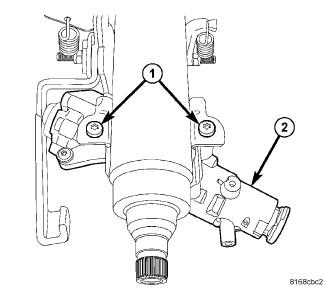
- Using a Tamper-Proof Torx® Plus (five point) 30 bit, remove the two screws (1) fastening the lock cylinder housing (2) to the column.
- Remove the lock cylinder housing from the steering column.
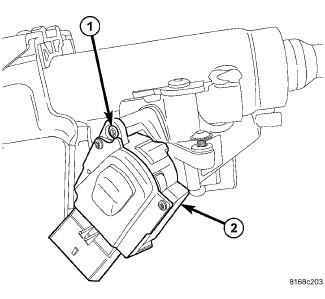 Courtesy of CHRYSLER GROUP, LLC
- Remove the ignition module (2) mounting screw (1).
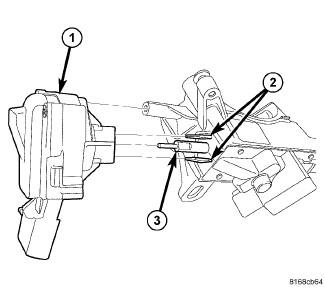 Courtesy of CHRYSLER GROUP, LLC
- Pull the module (1) straight out and off the retaining tabs (2) located on the lock cylinder housing.