Clevis Bracket
 Courtesy of CHRYSLER LLC
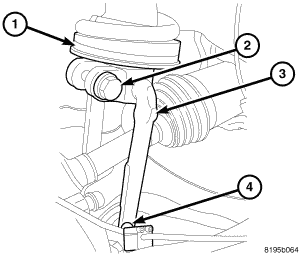
- Install the clevis bracket upper bolt (2) to the shock (1). Tighten the bolt (2) to 108 N.m (80 ft. lbs.).
- Raise the knuckle to the upper ball joint.
- Install the nut to the upper ball joint. Tighten the nut to 41 N.m (30 ft. lbs.) plus an additional 90° turn.
- Install the clevis bracket lower bolt (4) to the lower control arm. Tighten the bolt (4) to 150 N.m (110 ft. lbs.) with full vehicle weight.
- Install the lower stabilizer link bolt at the lower control arm. Tighten the bolt to 102 N.m (75 ft. lbs.) with full vehicle weight.
- Install the wheel speed sensor. Refer to INSTALLATION
.
- Install the disc brake rotor. Refer to INSTALLATION
.
- Install the tire and wheel assembly. Refer to STANDARD PROCEDURE
.
- Lower the vehicle.