Alternator Removal and Installation: Removal
- Do the battery terminal disconnection procedure (see BATTERY TERMINAL DISCONNECTION AND RECONNECTION
).
- Remove the engine cover (see step 1 on IGNITION COIL REMOVAL/INSTALLATION
).
- Remove the drive belt (see DRIVE BELT INSPECTION ).
- Disconnect the alternator connector (A), then remove the BLK wire (B) from the alternator.
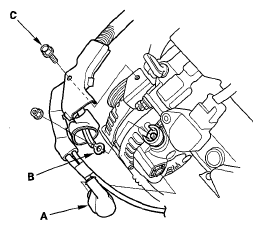 Courtesy of AMERICAN HONDA MOTOR CO., INC.
- Remove the bolt (C) securing the harness bracket.
- Remove the mounting bolt (A) and the alternator bracket mounting bolt (B), then remove the alternator.
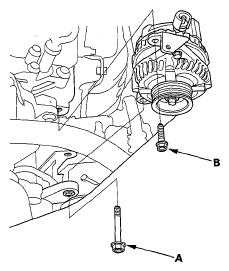 Courtesy of AMERICAN HONDA MOTOR CO., INC.