Alternator Removal and Installation: Installation
- Install the alternator, then tighten the mounting bolt (A) and the alternator bracket mounting bolt (B).
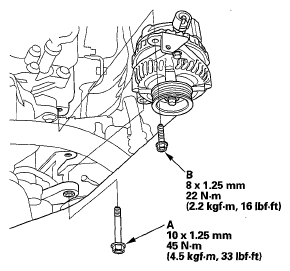 Courtesy of AMERICAN HONDA MOTOR CO., INC.
- Connect the alternator connector (A), then install the BLK wire (B) to the alternator. Make sure the crimped side of the ring terminal faces away from the alternator when you connect it.
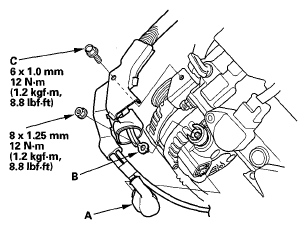 Courtesy of AMERICAN HONDA MOTOR CO., INC.
- Install the bolt (C) securing the harness bracket.
- Install the drive belt (see DRIVE BELT REPLACEMENT ).
- Install the engine cover.
- Do the battery terminal reconnection procedure (see BATTERY TERMINAL DISCONNECTION AND RECONNECTION
).