Water Pump Replacement
- Remove the right front wheel.
- Remove the splash shield (see
SPLASH SHIELD REPLACEMENT
).
- Drain the engine coolant (see COOLANT CHECK
).
- Loosen the water pump pulley mounting bolts.
- Remove the drive belt (see DRIVE BELT REPLACEMENT
).
- Remove the water pump pulley (A).
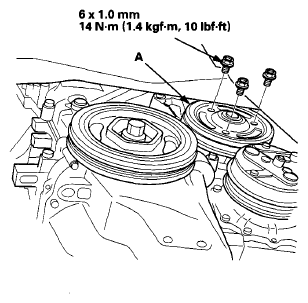 Courtesy of AMERICAN HONDA MOTOR CO., INC.
- Remove the five bolts securing the water pump (A), then remove the water pump.
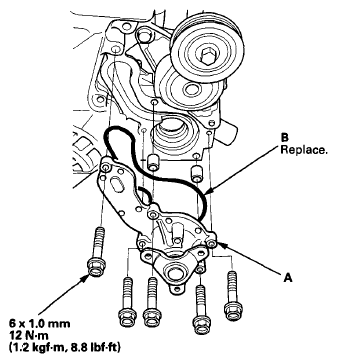 Courtesy of AMERICAN HONDA MOTOR CO., INC.
- Inspect and clean the mating surface with the engine block.
- Install the water pump with a new O-ring (B).
- Clean up any spilled engine coolant.
- Install the water pump pulley, and loosely install the water pump pulley mounting bolts.
- Install the drive belt (see DRIVE BELT AUTO-TENSIONER INSPECTION
).
- Tighten the water pump pulley mounting bolts.
- Install the splash shield (see
SPLASH SHIELD REPLACEMENT
).
- Install the right front wheel.
- Refill the radiator with engine coolant, and bleed the air from the cooling system (see step 8 on
).