ODS Unit Replacement: Installation
- Place the ODS unit (A) on the seat-back frame. Install the two bolts (B).
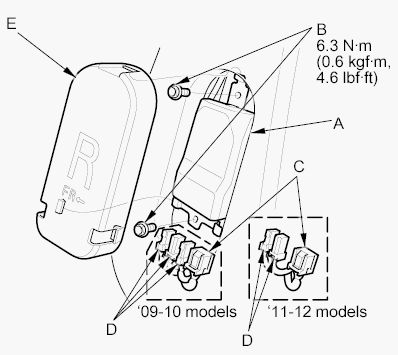 Courtesy of AMERICAN HONDA MOTOR CO., INC.
- Connect the ODS unit harness 18P connector (C) and OPDS sensor connectors (D) to the ODS unit. Reinstall the cover (E).
- Install the seat-back cover (see FRONT SEAT-BACK COVER/PAD REPLACEMENT
).
- Install the front passenger's seat assembly (see FRONT SEAT REMOVAL/INSTALLATION
), then connect the side airbag harness 2P connector.
- Do the battery terminal reconnection procedure (see BATTERY TERMINAL DISCONNECTION AND RECONNECTION
).
- Set the seat-back in the normal position, and make sure there is nothing on the front passenger's seat.
- Clear any DTCs with the HDS (see CLEAR THE DTC MEMORY ).
- Do the OPDS sensor initialization (see OPDS SENSOR INITIALIZATION
).
- Confirm proper SRS operation: Turn the ignition switch to ON (II), and check that the SRS indicator comes on for about 6 seconds and then goes off.