Navigation Switch Panel Removal/Installation
- Remove the navigation switch panel and the center pocket (A).
- Remove the dashboard center panel, (see DASHBOARD CENTER PANEL REMOVAL/INSTALLATION
)
- Remove the screws, then pull out the navigation switch panel and the center pocket.
- Disconnect the connectors and remove the navigation switch panel and the center Docket.
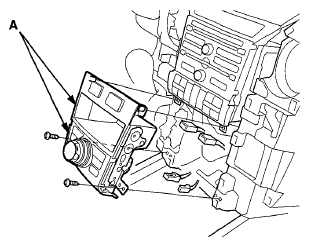 Courtesy of AMERICAN HONDA MOTOR CO., INC.
- Remove the screws and stays, then separate the navigation switch panel (A) and the center pocket (B).
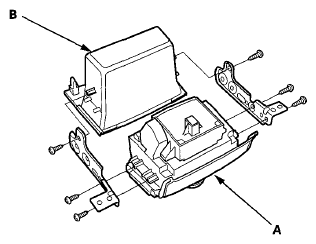 Courtesy of AMERICAN HONDA MOTOR CO., INC.
- Install the navigation switch panel in the reverse order of removal.