Front Floor Covering
- Remove these items:
- Remove the front floor covering (A).
- -1 Detatch the clips
- -2 Remove the screw, then remove the floor mat holder (B).
- -3 Release the Velcro fastener (C), then pull back the floor covering from under the heater unit.
- -4 Release the Velcro fasteners (D) on the front edge of the floor covering, then pull back the floor covering from under the dashboard.
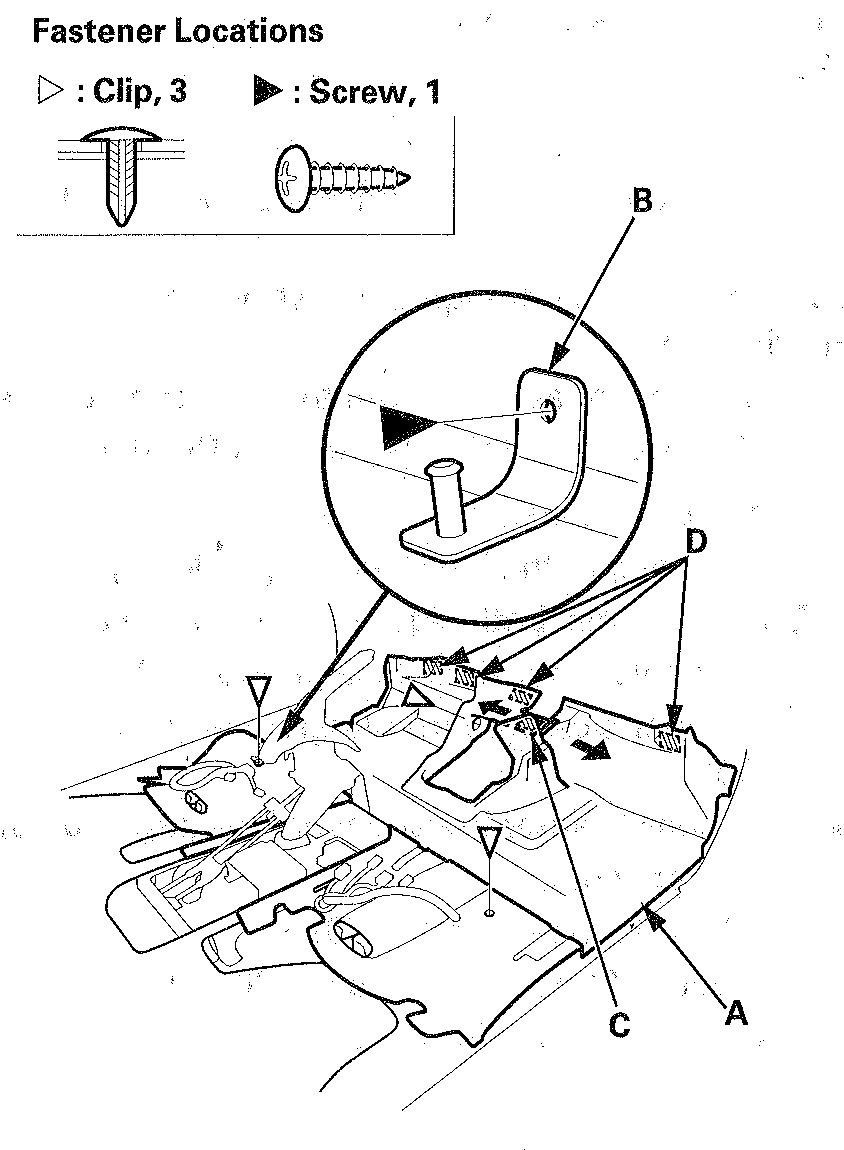 Courtesy of AMERICAN HONDA MOTOR CO., INC.
- Remove the front floor covering.
- Install the floor covering in the reverse order of removal, and note these items:
- Take care not to damage, wrinkle or twist the floor covering.
- Make sure the seat harnesses are routed correctly.
- Check if the clips are damaged or stress-whitened, and if necessary, replace them with new ones.
- Push the clips into place securely.