Wiper Motor Replacement
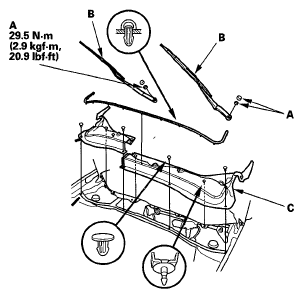
- Open the hood. Remove the caps, nuts (A), and the windshield wiper arms (B).
 Courtesy of AMERICAN HONDA MOTOR CO., INC.
- Remove the cowl covers (C).
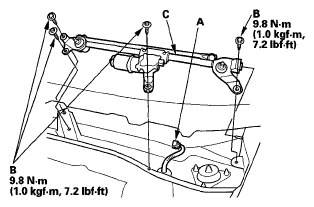
- Disconnect the 5P connector (A) from the wiper motor.
 Courtesy of AMERICAN HONDA MOTOR CO., INC.
- Remove the four bolts (B) and wiper linkage assembly (C).
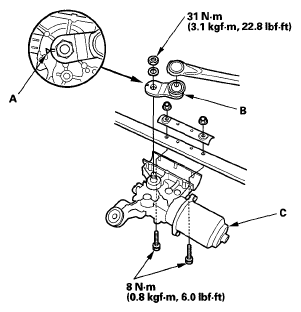
- Scribe a mark (A) across the link and windshield wiper linkage to show the original adjustment. Separate the windshield wiper linkage (B) from the wiper motor (C).
 Courtesy of AMERICAN HONDA MOTOR CO., INC.
- Install in the reverse order of removal, and note these items:
- Apply multipurpose grease to the moving parts.
- Before reinstalling the wiper arms, turn the wiper switch ON, then OFF to return the wiper shafts to the park position.
- If necessary, replace any damaged clips.
- Check the wiper motor operation.