4th Clutch Transmission Fluid Pressure Switch Replacement
- Remove the intake manifold cover and the intake air duct.
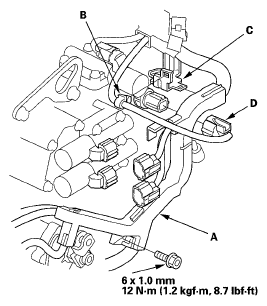
- Remove the bolt securing the harness cover (A).
 Courtesy of AMERICAN HONDA MOTOR CO., INC.
- Remove the harness clamp (B) from the harness cover/clamp bracket (C), disconnect the 4th clutch transmission fluid pressure switch connector (D), then remove the harness cover from the bracket.
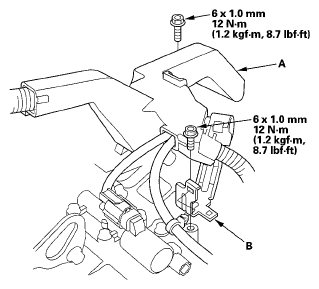
- Remove the bolts securing the harness cover (A) and the harness cover/clamp bracket (B).
 Courtesy of AMERICAN HONDA MOTOR CO., INC.
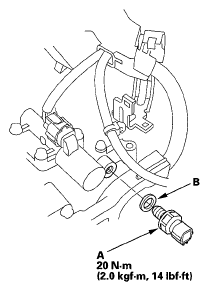
- Remove the 4th clutch transmission fluid pressure switch (A).
 Courtesy of AMERICAN HONDA MOTOR CO., INC.
- Make sure there is no water, oil, dust, or foreign particles inside the connector.
- Install a new 4th clutch transmission fluid pressure switch and a new sealing washer (B), and tighten the switch.
- Secure the harness cover and harness cover/clamp bracket with the bolts, and install the harness clamp on the bracket.
- Install the harness cover on the cover bracket, and secure it with the bolt.
- Connect the connector securely.
- Install the intake air duct and the intake manifold cover.