Thermostat Replacement: Installation
- Remove old liquid gasket from the thermostat housing mating surfaces, bolts and bolt holes.
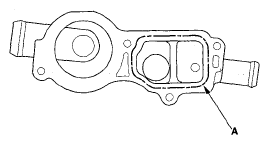
- Apply 1.5 mm wide bead of the liquid gasket, P/N 08717-0004, 08718-0001, 08718-0003, or 08718-0009, along the broken lines. Install the component within 5 minutes of applying the liquid gasket.
NOTE:
- If you apply liquid gasket P/N 08718-0012, the component must be installed within 4 minutes.
- If too much time has passed after applying the liquid gasket, remove the old liquid gasket and residue, then reapply new liquid gasket.
 Courtesy of AMERICAN HONDA MOTOR CO., INC.
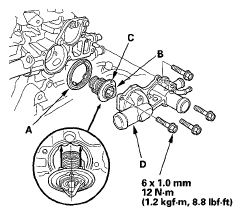
- Install the rubber seal (A) on the thermostat (B), then install the thermostat with the pin (C) on the top side.
 Courtesy of AMERICAN HONDA MOTOR CO., INC.
- Install the thermostat housing (D).
NOTE:
- Wait at least 30 minutes to allow liquid gasket to cure before filling the engine with engine coolant.
- Do not run the engine for at least 3 hours after installing the thermostat housing.
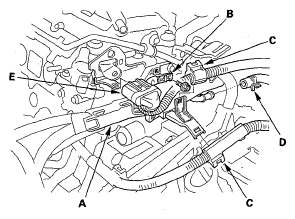
- Install the harness holder (A), ground cable (B), harness clamps (C), water bypass hose (D) and engine junction connector clamp (E).
 Courtesy of AMERICAN HONDA MOTOR CO., INC.
- Install the radiator hoses (see step 21 on
ENGINE INSTALLATION
).
- Install the air cleaner assembly (see
AIR CLEANER REMOVAL/INSTALLATION
).