Rear Seat Support Removal/Installation
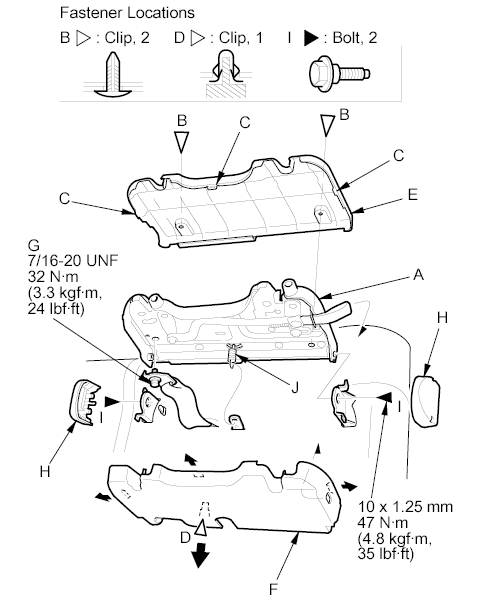
- Remove the seat support (A).
- Release the clips (B).
- Release the hooks (C), and detach the clip (D), then remove the outer support cover (E) and the inner support cover (F).
- Remove the rear seat belt buckle center anchor bolt (G).
- Remove the support bracket covers (H) from both sides.
- Remove the bolts (I).
- Release the support spring (J).
 Courtesy of AMERICAN HONDA MOTOR CO., INC.
- Install the seat support in the reverse order of removal, and note these items:
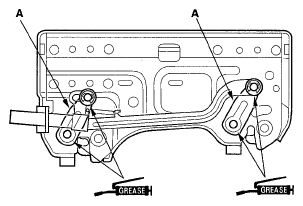
- Apply multipurpose grease to the moving portions of the link (A) as indicated by the arrows.
- Apply liquid thread lock to the center anchor bolt before reinstallation.
- Make sure there are no twists or kinks in the seat belt buckle before reinstallation.
- When installing the inner support cover, slip the strap through the hole in the cover.
 Courtesy of AMERICAN HONDA MOTOR CO., INC.