All Windows Do Not Operate With All Window Switches
- Turn ignition switch to ON position. Using test light, backprobe between ground and power window/door lock switch White 14-pin connector terminals No. 10 and 11 (Black wires). If test light does not illuminate at both terminals or only illuminates at one terminal, go to step 4). If test light illuminates at both terminals, go to next step.
- Using test light, backprobe between power window/door lock switch White 14-pin connector terminal No. 3 (White/Black wire) and battery voltage. Using test light, backprobe between power window/door lock switch White 14-pin connector terminal No. 4 (White/Black wire) and battery voltage.
- If test light illuminates at both terminals, replace power window/door lock switch. If test light illuminates at only one terminal, repair open in White/Black wire between suspect terminal and splice S503. If test light does not illuminate at either terminal, repair open in White/Black wire between splices S503 and S240.
- If test light does not illuminate at either terminal, go to next step. If test light illuminates at only one terminal, repair open in Black wire between terminal that did not illuminate and splice S502.
- Using test light, backprobe between power accessory relay connector terminal No. 4 (Black wire) and ground. If test light does not illuminate, go to next step. If test light illuminates, repair open in Black wire between accessory power relay and splice S502.
- Using test light, backprobe between power accessory relay connector terminal No. 1 (White/Red wire) and ground. If test light illuminates, go to next step. If test light does not illuminate, check for open in White/Red wire. If White/Red wire is okay, replace junction block No. 1.
- Using test light, backprobe between accessory power relay connector terminal No. 3 (Red/Blue wire) and ground. If test light illuminates, go to step 9). If test light does not illuminate, go to next step.
- Using voltmeter, backprobe between audio alarm module connector terminal No. 9 (Red/Blue wire) and ground. If reading is less than 10 volts, replace audio alarm module and retest system. If system remains inoperative, replace junction block No. 1. If reading is 10 volts or more, check for open in Red/Blue wire(s) between audio alarm module, junction block No. 3 and accessory power relay. If Red/Blue wires are okay, replace junction block No. 3.
- Using test light, backprobe between accessory power relay terminal No. 2 (White/Black wire) and battery voltage. If test light illuminates, replace accessory power relay. If test light does not illuminate, check for open in White/Black wire(s) between accessory power relay, junction connector No. 1 and ground connection. Ground connection is located behind left kick panel. If White/Black wire is okay, replace junction connector No. 1.
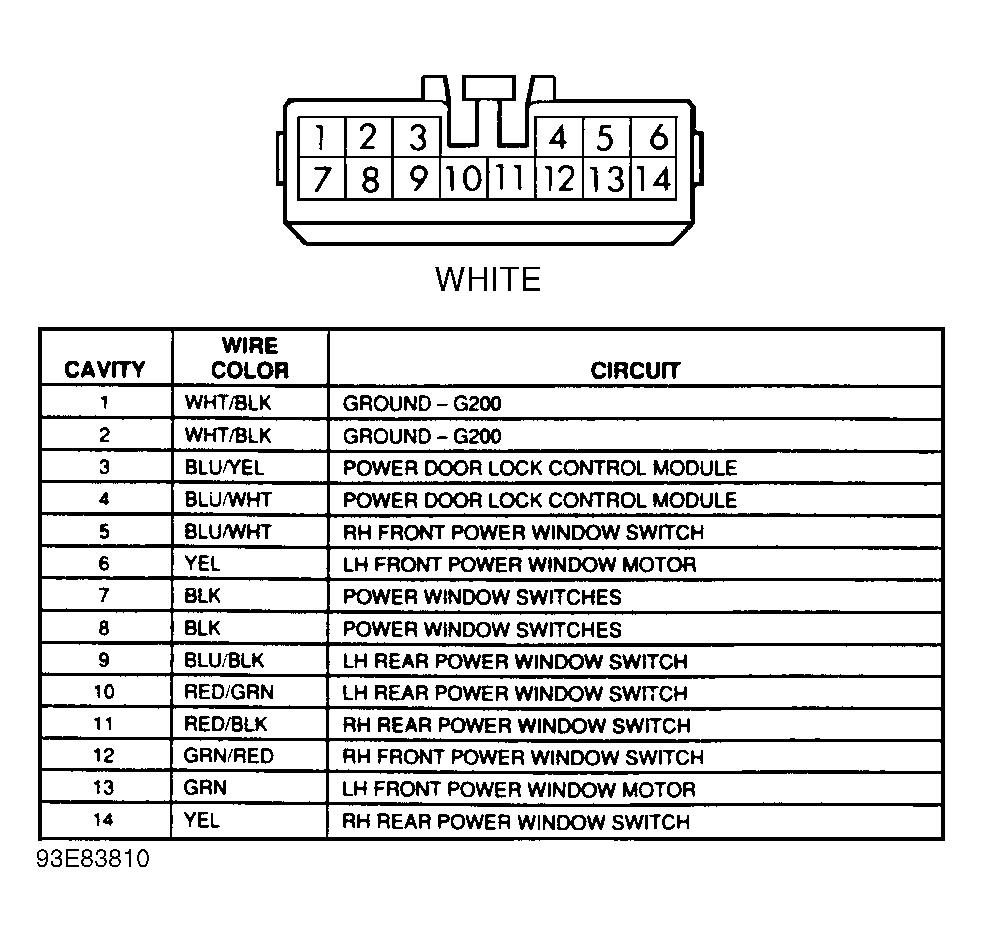 Courtesy of GENERAL MOTORS CORP.
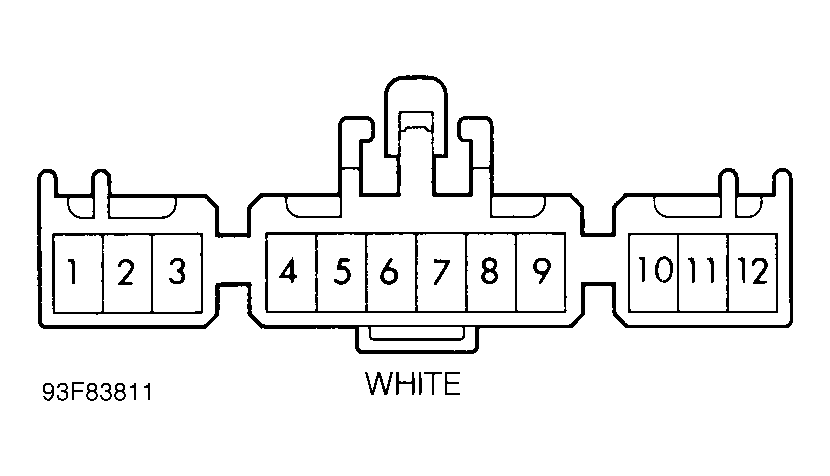 Courtesy of GENERAL MOTORS CORP.