Pinpoint Test
- CHECK FOR STUCK/STICKING ACCESSORY DELAY RELAY
- Disconnect: Accessory Delay Relay.
- Do the power windows still operate?
- Yes:
GO to step 3
.
- No:
GO to step 2
.
- CHECK THE ACCESSORY DELAY RELAY
- Carry out the accessory delay relay component test. Refer to SYSTEM WIRING DIAGRAMS
for component testing.
- Did the accessory delay relay pass the component test?
- Yes:
GO to step 4
.
- No:
INSTALL a new accessory delay relay.
- CHECK THE DELAYED ACCESSORY RELAY OUTPUT CIRCUIT FOR A SHORT TO VOLTAGE
- Ignition OFF.
- Disconnect: Body Control Module (BCM) C2280D.
- Disconnect: Left Hand (LH) Front Window Control Switch C535B (Base) or C504 (XLT or Limited).
- Ignition ON.
- Measure:
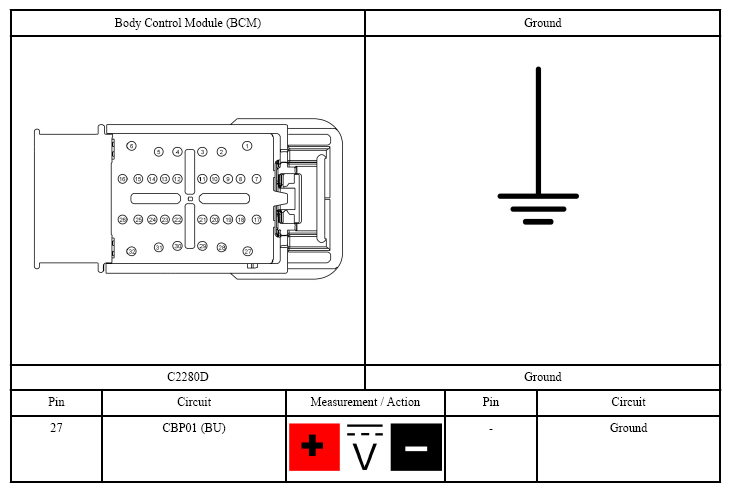 Courtesy of FORD MOTOR CO.
- Yes:
REPAIR the circuit.
- No:
GO to step 4
.
- CHECK FOR CORRECT Body Control Module (BCM) OPERATION
- Ignition OFF.
- Disconnect and inspect all Body Control Module (BCM) connectors.
- Repair:
- corrosion (install new connector or terminals - clean module pins)
- damaged or bent pins - install new terminals/pins as necessary
- pushed-out pins - install new pins as necessary
- Reconnect the Body Control Module (BCM) connectors. Make sure they seat and latch correctly.
- Operate the system and determine if the concern is still present.
- Is the concern still present?
- Yes:
CHECK On-Line Automotive Service Information System (OASIS) for any applicable Technical Service Bulletins (TSBs). If a Technical Service Bulletin (TSB) exists for this concern, DISCONTINUE this test and FOLLOW Technical Service Bulletin (TSB) instructions. If no Technical Service Bulletins (TSBs) address this concern, INSTALL a new Body Control Module (BCM). REFER to BODY CONTROL MODULE (BCM) - WITH INTELLIGENT ACCESS (IA)
or REFER to BODY CONTROL MODULE (BCM) - WITHOUT INTELLIGENT ACCESS (IA)
.
- No:
The system is operating correctly at this time. The concern may have been caused by module connections. ADDRESS the root cause of any connector or pin issues.