Diagnosis & Testing: Self-Diagnostics: Notes
- To perform diagnostic tests using DRB, DRB must be in ABS MENU. At ABS MENU, fault codes and DRB test functions can be accessed. To reach ABS MENU, locate data link connector. Connector is located on driver's side under dash. See Fig 1
.
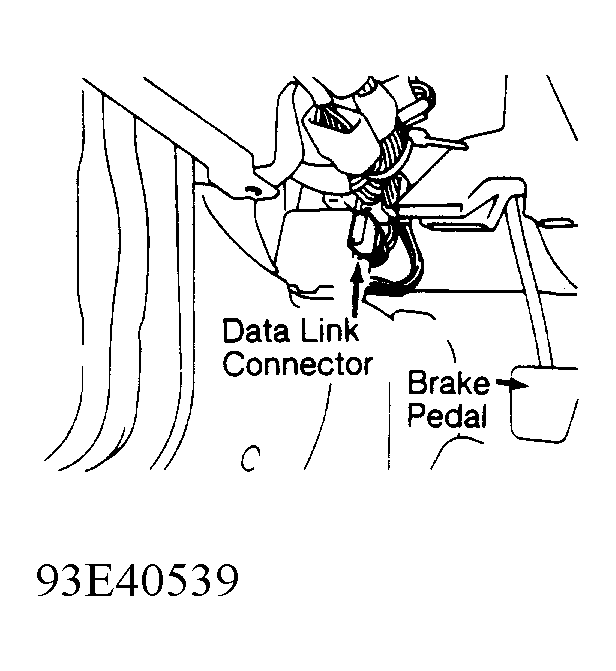 Courtesy of CHRYSLER CORP.
- With ignition switch in OFF position, connect DRB. On AWD models, connect Adapter Harness (MB991356) between data link connector and DRB. On all models, turn ignition switch to RUN position. All DRB character positions will glow and copyright information will appear on screen for a few seconds.
- After a few seconds, DRB menu will appear. At DRB menu, press "4" (SELECT SYSTEM) key to enter diagnostic test program. Select "4" (ABS) key to enter ABS part of DRB program. After a few seconds, SELECT DRIVE TYPE will appear.
- Select "1" for FWD or "2" for AWD. After a few seconds, ABS MENU will appear. Screen will display a menu of DRB test categories for anti-lock brake system.
- At ABS menu of anti-lock brake system diagnostic program, specific test functions programmed into DRB cartridge can be performed. Following DRB modes can be accessed: SYSTEM TEST, READ FAULTS, STATE DISPLAY, ACTUATOR TEST and ADJUSTMENTS.